

[2025] Professional-Cloud-Network-Engineer All-in-One Exam Guide Practice To your Professional-Cloud-Network-Engineer Exam!
Preparations of Professional-Cloud-Network-Engineer Exam 2025 Google Cloud Platform Unlimited 236 Questions
The Google Professional-Cloud-Network-Engineer exam covers a wide range of topics related to cloud networking, including network design, implementation, optimization, and security. Professionals taking Professional-Cloud-Network-Engineer exam should have a strong understanding of networking concepts, such as IP addressing, routing, and subnetting. They should also be familiar with Google Cloud Platform services, such as Virtual Private Cloud (VPC), Cloud Load Balancing, and Cloud Armor.
Google Professional-Cloud-Network-Engineer (Google Cloud Certified - Professional Cloud Network Engineer) Exam is a certification exam offered by Google Cloud. Professional-Cloud-Network-Engineer exam is designed to test the skills and knowledge of individuals who are interested in becoming a professional cloud network engineer. Professional-Cloud-Network-Engineer exam covers a wide range of topics related to cloud networking, including designing and implementing network infrastructure, configuring network services, and managing network security.
Implement Hybrid Interconnectivity
- Configure Cloud Router for Dependability: You will also be expected to demonstrate competence in this domain as well as in the configuration of site-to-site IPsec VPN.
- Configure Interconnect: This part measures one’s understanding of partner (that is layer 2 versus layer 3 connectivity), bulk storage uploads, and virtualizing with the use of VLAN attachments;
NEW QUESTION # 58
Question:
Your organization has a new security policy that requires you to monitor all egress traffic payloads from your virtual machines in the us-west2 region. You deployed an intrusion detection system (IDS) virtual appliance in the same region to meet the new policy. You now need to integrate the IDS into the environment to monitor all egress traffic payloads from us-west2. What should you do?
- A. Enable VPC Flow Logs. Create a sink in Cloud Logging to send filtered egress VPC Flow Logs to the IDS.
- B. Create an internal TCP/UDP load balancer for Packet Mirroring, and add a packet mirroring policy filter for egress traffic.
- C. Enable firewall logging and forward all filtered egress firewall logs to the IDS.
- D. Create an internal HTTP(S) load balancer for Packet Mirroring, and add a packet mirroring policy filter for egress traffic.
Answer: B
Explanation:
Packet Mirroring with an internal TCP/UDP load balancer allows for comprehensive monitoring of egress traffic, which includes payloads. This is required for integration with an IDS for detailed inspection of traffic payloads, meeting the security policy needs for monitoring and detection.
Reference: Google Cloud - Packet Mirroring
NEW QUESTION # 59
You are a admin at XYZ organization. Few of your team members need to use BigQuery Data Transfer Service for Amazon S3 . They want to automatically schedule and manage recurring load jobs from Amazon S3 into BigQuery, they want to run the transfer job every week. They have, Amazon S3 URI for the source data, access key ID , secret access key and Read permission on the data source . What necessary permissions are required for the transfer job creators in BigQuery .
- A. bigquery.jobs.create and bigquery.transfers.get
- B. bigquery.transfers.update and bigquery.datasets.update
- C. bigquery.transfer.get and bigquery.data.sets.update
- D. bigquery.transfers.update and bigquery.transfers.get
Answer: B
Explanation:
Option A is the correct choice because bigquery.transfers.update permissions is needed to create the transfer and bigquery.datasets.update permissions is needed on the target dataset .Also The bigquery.admin predefined Cloud IAM role includes bigquery.transfers.update and bigquery.datasets.update permissions .
Option B is Incorrect because , it is not the required permission for transfer job creators.
Option C and Option D are Incorrect because , they are not the required permission for transfer job creators.
NEW QUESTION # 60
You have deployed a proof-of-concept application by manually placing instances in a single Compute Engine zone. You are now moving the application to production, so you need to increase your application availability and ensure it can autoscale.
How should you provision your instances?
- A. Create a single managed instance group, specify the desired region, and select Multiple zones for the location.
- B. Create an unmanaged instance group in a single zone, and then create an HTTP load balancer for the instance group.
- C. Create a managed instance group for each region, select Single zone for the location, and manually distribute instances across the zones in that region.
- D. Create an unmanaged instance group for each zone, and manually distribute the instances across the desired zones.
Answer: C
NEW QUESTION # 61
Your end users are located in close proximity to us-east1 and europe-west1. Their workloads need to communicate with each other. You want to minimize cost and increase network efficiency.
How should you design this topology?
- A. Create 1 VPC with 2 regional subnets. Create a global load balancer to establish connectivity between the regions.
- B. Create 2 VPCs, each with their own region and individual subnets. Use external IP addresses on the instances to establish connectivity between these regions.
- C. Create 1 VPC with 2 regional subnets. Deploy workloads in these subnets and have them communicate using private RFC1918 IP addresses.
- D. Create 2 VPCs, each with their own regions and individual subnets. Create 2 VPN gateways to establish connectivity between these regions.
Answer: C
Explanation:
https://cloud.google.com/vpc/docs/using-vpc#create-auto-network
We create one VPC network in auto mode that creates one subnet in each Google Cloud region automatically.
So, region us-east1 and europe-west1 are in the same network and they can communicate using their internal IP address even though they are in different Regions. They take advantage of Google's global fiber network.
NEW QUESTION # 62
Your company just completed the acquisition of Altostrat (a current GCP customer). Each company has a separate organization in GCP and has implemented a custom DNS solution. Each organization will retain its current domain and host names until after a full transition and architectural review is done in one year. These are the assumptions for both GCP environments.
* Each organization has enabled full connectivity between all of its projects by using Shared VPC.
* Both organizations strictly use the 10.0.0.0/8 address space for their instances, except for bastion hosts (for accessing the instances) and load balancers for serving web traffic.
* There are no prefix overlaps between the two organizations.
* Both organizations already have firewall rules that allow all inbound and outbound traffic from the 10.0.0.0
/8 address space.
* Neither organization has Interconnects to their on-premises environment.
You want to integrate networking and DNS infrastructure of both organizations as quickly as possible and with minimal downtime.
Which two steps should you take? (Choose two.)
- A. Create a third organization with a new host project, and attach all projects from your company and Altostrat to it using shared VPC.
- B. Set up some variant of DNS forwarding and zone transfers in each organization.
- C. Connect VPCs in both organizations using Cloud VPN together with Cloud Router.
- D. Use Cloud DNS to create A records of all VMs and resources across all projects in both organizations.
- E. Provision Cloud Interconnect to connect both organizations together.
Answer: B,C
Explanation:
https://cloud.google.com/dns/docs/best-practices
NEW QUESTION # 63
You are designing a hub-and-spoke network architecture for your company's cloud-based environment. You need to make sure that all spokes are peered with the hub. The spokes must use the hub's virtual appliance for internet access.
The virtual appliance is configured in high-availability mode with two instances using an internal load balancer with IP address 10.0.0.5. What should you do?
- A. Create a default route in the hub VPC that points to IP address 10.0.0.5.
Delete the default internet gateway route in the hub VPC, and create a new higher-priority route that is tagged only to the appliances with a next hop of the default internet gateway.
Export the custom routes in the hub. Import the custom routes in the spokes.
Delete the default internet gateway route of the spokes. - B. Create a default route in the hub VPC that points to IP address 10.0.0.5.
Delete the default internet gateway route in the hub VPC, and create a new higher-priority route that is tagged only to the appliances with a next hop of the default internet gateway.
Export the custom routes in the hub.
Import the custom routes in the spokes. - C. Create a default route in the hub VPC that points to IP address 10.0.0.5.
Delete the default internet gateway route in the hub VPC, and create a new higher-priority route that is tagged only to the appliances with a next hop of the default internet gateway.
Create a new route in the spoke VPC that points to IP address 10.0.0.5. - D. Create two default routes in the hub VPC that point to the next hop instances of the virtual appliances.
Delete the default internet gateway route in the hub VPC, and create a new higher-priority route that is tagged only to the appliances with a next hop of the default internet gateway.
Export the custom routes in the hub. Import the custom routes in the spokes.
Answer: A
NEW QUESTION # 64
You are deploying an HA VPN within Google Cloud. You need to exchange routes dynamically between your on-premises gateway and Google Cloud. You have already created an HA VPN gateway and a peer VPN gateway resource. What should you do?
- A. Create a Cloud Router, add VPN tunnels, and enable global dynamic routing.
- B. Create a Cloud Router, add VPN tunnels, and then configure BGP sessions.
- C. Create a second HA VPN gateway, add VPN tunnels, and enable global dynamic routing.
- D. Create a Cloud Router, add VPN tunnels, and then configure static routes to your subnet ranges.
Answer: B
Explanation:
Explanation: To dynamically exchange routes between Google Cloud and your on-premises gateway, you need to create a Cloud Router and configure BGP sessions after adding VPN tunnels. BGP allows for dynamic route exchange, which is essential for establishing proper communication between the environments.
NEW QUESTION # 65
You are in the process of deploying an internal HTTP(S) load balancer for your web server virtual machine (VM) Instances What two prerequisite tasks must be completed before creating the load balancer?
Choose 2 answers
- A. Determine the subnet mask for a proxy-only subnet.
- B. Reserve a static IP address for the load balancer
- C. Determine the subnet mask for Serverless VPC Access.
- D. Create firewall rules for health checks
- E. Choose a region.
Answer: B,D
Explanation:
The correct answer is B and C. You must create firewall rules for health checks and reserve a static IP address for the load balancer before creating the internal HTTP(S) load balancer.
The other options are not correct because:
Option A is not a prerequisite task. You can choose a region when you create the load balancer, but you do not need to do it beforehand.
Option D is not a prerequisite task. You can determine the subnet mask for a proxy-only subnet when you create the subnet, but you do not need to do it beforehand.
Option E is not related to the internal HTTP(S) load balancer. Serverless VPC Access is a feature that allows you to connect your serverless applications to your VPC network, but it is not required for the load balancer.
NEW QUESTION # 66
You need to restrict access to your Google Cloud load-balanced application so that only specific IP addresses can connect.
What should you do?
- A. Create a secure perimeter using VPC Service Controls, and mark the load balancer as a service restricted to the source IP range of the allowed clients and Google health check IP ranges.
- B. Create a secure perimeter using the Access Context Manager feature of VPC Service Controls and restrict access to the source IP range of the allowed clients and Google health check IP ranges.
- C. Label the backend instances "application," and create a firewall rule with the target label "application" and the source IP range of the allowed clients and Google health check IP ranges.
- D. Tag the backend instances "application," and create a firewall rule with target tag "application" and the source IP range of the allowed clients and Google health check IP ranges.
Answer: D
Explanation:
https://link.springer.com/chapter/10.1007/978-1-4842-1004-8_4
NEW QUESTION # 67
You have the networking configuration shown In the diagram Two VLAN attachments associated With two Dedicated Interconnect connections terminate on the same Cloud Router (mycloudrouter). The Interconnect connections terminate on two separate on-premises routers. You advertise the same prefixes from the Border Gateway Protocol (BOP) sessions associated With each Of the VLAN attachments.
You notice an asymmetric traffic flow between the two Interconnect connections. Which of the following actions should you take to troubleshoot the asymmetric traffic flow?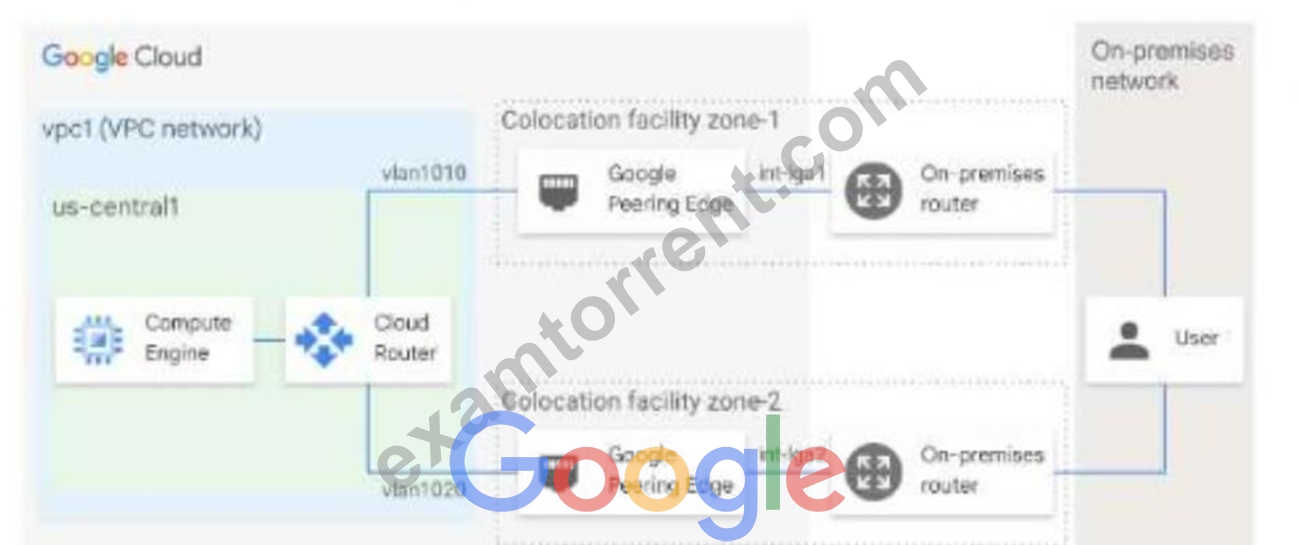
- A. From the Cloud CLI. run gcloud compute routers describe mycloudrouter
- B. From the Cloud CLI, run gcloud compute -protect_ID router get-status mycloudrouter --region REGION and review the results.
- C. From the Google Cloud console, navigate to the Hybrid Connectivity select the Cloud Router, and view BGP sessions.
- D. From the Google Cloud console, navigate to Cloud Logging to view VPC Flow Logs and review the results
Answer: B
Explanation:
--region REGION and review the results
Explanation:
The correct answer is B. From the Cloud CLI, run gcloud compute --project_ID router get-status mycloudrouter --region REGION and review the results.
This command will show you the BGP session status, the advertised and learned routes, and the last error for each VLAN attachment. You can use this information to troubleshoot the asymmetric traffic flow and identify any issues with the BGP configuration or the Interconnect connections.
The other options are not correct because:
Option A will only show you the BGP session status, but not the advertised and learned routes or the last error for each VLAN attachment.
Option C will only show you the VPC Flow Logs, which are useful for monitoring and troubleshooting network performance and security issues within your VPC network, but not for your Interconnect connections.
Option D will only show you the basic information about the Cloud Router, such as its name, region, network, and BGP settings, but not the detailed status of each VLAN attachment.
NEW QUESTION # 68
You have provisioned a Dedicated Interconnect connection of 20 Gbps with a VLAN attachment of 10 Gbps.
You recently noticed a steady increase in ingress traffic on the Interconnect connection from the on-premises data center. You need to ensure that your end users can achieve the full 20 Gbps throughput as quickly as possible. Which two methods can you use to accomplish this? (Choose two.)
- A. Configure an additional VLAN attachment of 10 Gbps in the same region. Configure the on-premises router to advertise routes with the same multi-exit discriminator (MED).
- B. Configure an additional VLAN attachment of 10 Gbps in another region. Configure the on-premises router to advertise routes with the same multi-exit discriminator (MED).
- C. From the Google Cloud Console, request a new Dedicated Interconnect connection of 20 Gbps, and configure a VLAN attachment of 10 Gbps.
- D. Configure Link Aggregation Control Protocol (LACP) on the on-premises router to use the 20-Gbps Dedicated Interconnect connection.
- E. From the Google Cloud Console, modify the bandwidth of the VLAN attachment to 20 Gbps.
Answer: D,E
NEW QUESTION # 69
Your organization is implementing a new security policy to control how firewall rules are applied to control flows between virtual machines (VMs). Using Google-recommended practices, you need to set up a firewall rule to enforce strict control of traffic between VM A and VM B.
You must ensure that communications flow only from VM A to VM B within the VPC, and no other communication paths are allowed. No other firewall rules exist in the VPC. Which firewall rule should you configure to allow only this communication path?
- A. Firewall rule direction: ingress
Action: allow
Target: VM A service account
Source ranges: VM B service account and VM B source IP address
Priority: 100 - B. Firewall rule direction: ingress
Action: allow
Target: VM B service account
Source ranges: VM A service account
Priority: 1000 - C. Firewall rule direction: ingress
Action: allow
Target: specific VM A tag
Source ranges: VM B tag and VM B source IP address
Priority: 100 - D. Firewall rule direction: ingress
Action: allow
Target: specific VM B tag
Source ranges: VM A tag and VM A source IP address
Priority: 1000
Answer: C
NEW QUESTION # 70
Your frontend application VMs and your backend database VMs are all deployed in the same VPC but across different subnets. Global network firewall policy rules are configured to allow traffic from the frontend VMs to the backend VMs. Based on a recent compliance requirement, this traffic must now be inspected by network virtual appliances (NVAs) firewalls that are deployed in the same VPC. The NVAs are configured to be full network proxies and will source NAT-allowed traffic. You need to configure VPC routing to allow the NVAs to inspect the traffic between subnets. What should you do?
- A. Place your NVAs behind an internal passthrough Network Load Balancer named ilb1. Add global network firewall policy rules to allow traffic through your NVAs. Create a policy-based route (PBR) with the source IP range of the frontend VM subnet, destination IP range of the backend VM subnet, and the next hop of ilb1. Scope the PBR to the VMs with the frontend network tag. Add a frontend network tag to your frontend servers.
- B. Place your NVAs behind an internal passthrough Network Load Balancer named ilb1. Add global network firewall policy rules to allow traffic through your NVAs. Create a custom static route with the destination IP range of the backend VM subnet, frontend instance tag, and the next hop of ilb1. Add a frontend network tag to your frontend VMs.
- C. Create your NVA with multiple interfaces. Configure NIC0 for NVA in the backend subnet. Configure NIC1 for NVA in the frontend subnet. Place your NVAs behind an internal passthrough Network Load Balancer named ilb1. Add global network firewall policy rules to allow traffic through your NVAs.
Create a custom static route with the destination IP range of the backend VM subnet, frontend instance tag, and the next hop of ilb1. Add a frontend network tag to your frontend VMs. - D. Place your NVAs behind an internal passthrough Network Load Balancer named ilb1. Add the global network firewall policy rules to allow traffic through your NVAs. Create a policy-based route (PBR) with the source IP range of the backend VM subnet, destination IP range of the frontend VM subnet, and the next hop of ilb1. Scope the PBR to the VMs with the backend network tag. Add a backend network tag to your backend servers.
Answer: A
Explanation:
Explanation: The correct solution requires creating a policy-based route (PBR) to force the traffic from the frontend subnet to the backend subnet through the NVA. The PBR should be scoped to the frontend VMs, with the next hop being the passthrough load balancer (ilb1) behind which the NVAs reside. This ensures that all traffic is inspected by the NVA before reaching the backend.
: Google Cloud Policy-based Routing Documentation
NEW QUESTION # 71
Question:
Your organization is developing a landing zone architecture with the following requirements:
* No communication between production and non-production environments.
* Communication between applications within an environment may be necessary.
* Network administrators should centrally manage all network resources, including subnets, routes, and firewall rules.
* Each application should be billed separately.
* Developers of an application within a project should have the autonomy to create their compute resources.
* Up to 1000 applications are expected per environment.
What should you do?
- A. Create a design that has a Shared VPC for each project. Implement hierarchical firewall policies to apply micro-segmentation between VPCs.
- B. Create a design where each project has its own VPC. Ensure all VPCs are connected by a Network Connectivity Center hub that is centrally managed by the network team.
- C. Create a design that has one host project with a Shared VPC for the production environment, another host project with a Shared VPC for the non-production environment, and a service project that is associated with the corresponding host project for each initiative.
- D. Create a design that implements a single Shared VPC. Use VPC firewall rules with secure tags to enforce micro-segmentation between environments.
Answer: C
Explanation:
Using separate Shared VPCs for production and non-production environments in different host projects (Option D) meets all requirements. This design allows network administrators to centrally manage resources within each Shared VPC while ensuring isolation between environments and separate billing. By associating service projects with each host project, developers can manage resources within their project without affecting the overall VPC network structure.
NEW QUESTION # 72
Your company has recently installed a Cloud VPN tunnel between your on-premises data center and your Google Cloud Virtual Private Cloud (VPC). You need to configure access to the Cloud Functions API for your on-premises servers. The configuration must meet the following requirements:
Certain data must stay in the project where it is stored and not be exfiltrated to other projects.
Traffic from servers in your data center with RFC 1918 addresses do not use the internet to access Google Cloud APIs.
All DNS resolution must be done on-premises.
The solution should only provide access to APIs that are compatible with VPC Service Controls.
What should you do?
- A. Create an A record for restricted.googleapis.com using the 199.36.153.4/30 address range.
Create a CNAME record for *.googleapis.com that points to the A record.
Configure your on-premises routers to use the Cloud VPN tunnel as the next hop for the addresses you used in the A record.
Configure your on-premises firewalls to allow traffic to the restricted.googleapis.com addresses. - B. Create an A record for private.googleapis.com using the 199.36.153.8/30 address range.
Create a CNAME record for *.googleapis.com that points to the A record.
Configure your on-premises routers to use the Cloud VPN tunnel as the next hop for the addresses you used in the A record.
Configure your on-premises firewalls to allow traffic to the private.googleapis.com addresses. - C. Create an A record for private.googleapis.com using the 199.36.153.8/30 address range.
Create a CNAME record for *.googleapis.com that points to the A record.
Configure your on-premises routers to use the Cloud VPN tunnel as the next hop for the addresses you used in the A record.
Remove the default internet gateway from the VPC where your Cloud VPN tunnel terminates. - D. Create an A record for restricted.googleapis.com using the 199.36.153.4/30 address range.
Create a CNAME record for *.googleapis.com that points to the A record.
Configure your on-premises routers to use the Cloud VPN tunnel as the next hop for the addresses you used in the A record.
Remove the default internet gateway from the VPC where your Cloud VPN tunnel terminates.
Answer: D
NEW QUESTION # 73
......
Focus on Professional-Cloud-Network-Engineer All-in-One Exam Guide For Quick Preparation: https://www.examtorrent.com/Professional-Cloud-Network-Engineer-valid-vce-dumps.html
Practice To Professional-Cloud-Network-Engineer - ExamTorrent Remarkable Practice On your Google Cloud Certified - Professional Cloud Network Engineer Exam: https://drive.google.com/open?id=17tGq5SVN_hN3TsSexTxyhbuOUcgW1u9d
