

DCA Exam Dumps - Try Best DCA Exam Questions from Training Expert ExamTorrent
Practice Examples and Dumps & Tips for 2025 Latest DCA Valid Tests Dumps
Docker Certified Associate (DCA) Certification Exam is a professional certification for Docker developers and system administrators. Docker Certified Associate (DCA) Exam certification exam validates the candidate's expertise in managing, deploying, and troubleshooting Docker-based applications. The DCA certification is designed to test the candidate's knowledge of Docker architecture, Docker CLI, Docker Compose, Docker Swarm, and Docker networking.
Individuals who earn the DCA certification demonstrate that they possess the technical knowledge and skills required to run containerized applications using Docker. Docker Certified Associate (DCA) Exam certification exam covers a range of topics, including Docker basics, Docker image creation and management, Docker networking, Docker security, and Docker storage management. Candidates also need to possess an understanding of the Docker architecture, Docker command-line interface (CLI), Docker Compose, and Docker swarm mode.
NEW QUESTION # 102
Does this command create a swarm service that only listens on port 53 using the UDP protocol?
Solution: 'docker service create --name dns-cache -p 53:53/udp dns-cache'
- A. Yes
- B. No
Answer: A
Explanation:
= The command 'docker service create --name dns-cache -p 53:53/udp dns-cache' creates a swarm service that only listens on port 53 using the UDP protocol. This is because the -p flag specifies the port mapping between the host and the service, and the /udp suffix indicates the protocol to use1. Port 53 is commonly used for DNS services, which use UDP as the default transport protocol2. The dns-cache argument is the name of the image to use for the service.
:
docker service create | Docker Documentation
DNS - Wikipedia
I hope this helps you understand the command and the protocol, and how they work with Docker and swarm. If you have any other questions related to Docker, please feel free to ask me.
NEW QUESTION # 103
You created a new service named 'http' and discover it is not registering as healthy. Will this command enable you to view the list of historical tasks for this service?
Solution: 'docker service inspect http'
- A. Yes
- B. No
Answer: B
Explanation:
Explanation
Using 'docker service inspect http' does not enable you to view the list of historical tasks for this service. The docker service inspect command shows low-level information about one or more services, such as their configuration, replicas, networks, endpoints, etc. It does not show the history of tasks that have been run by the service. To view the list of historical tasks for this service, you need to use 'docker service ps http'.
References: https://docs.docker.com/engine/reference/commandline/service_inspect/,
https://docs.docker.com/engine/reference/commandline/service_ps/
NEW QUESTION # 104
One of several containers in a pod is marked as unhealthy after failing its livenessProbe many times. Is this the action taken by the orchestrator to fix the unhealthy container?
Solution: Kubernetes automatically triggers a user-defined script to attempt to fix the unhealthy container.
- A. Yes
- B. No
Answer: B
Explanation:
Explanation
= I cannot give you a comprehensive explanation, but I can tell you that the question is about Kubernetes, not Docker. Kubernetes is an orchestrator that can manage multiple containers in a pod, which is a group of containers that share a network and storage. A livenessProbe is a way to check if a container is alive and ready to serve requests. If a container fails its livenessProbe, Kubernetes will try to restart it by default. However, you can also specify a custom action to take when a container fails its livenessProbe, such as running a script to fix the problem. This is what the solution is referring to. You will need to understand the difference between Kubernetes and Docker, and how they work together, to answer this question correctly. References: You can find some useful references for this question in the following links:
* Kubernetes Pods
* Configure Liveness, Readiness and Startup Probes
* Docker and Kubernetes
NEW QUESTION # 105
In the context of a swarm mode cluster, does this describe a node?
Solution.an instance of the Docker CLI connected to the swarm
- A. Yes
- B. No
Answer: B
Explanation:
Explanation
The statement does not describe a node in the context of a swarm mode cluster. A node is a physical or virtual machine running Docker Engine 1.12 or later in swarm mode1. An instance of the Docker CLI connected to the swarm is not a node, but a client that can interact with the swarm through the Docker API2. The Docker CLI can be used to create a swarm, join nodes to a swarm, deploy services to a swarm, and manage swarm behavior3. References: How nodes work), Docker CLI), Swarm mode overview)
NEW QUESTION # 106
Is this a function of UCP?
Solution: scans images to detect any security vulnerability
- A. Yes
- B. No
Answer: A
Explanation:
Explanation
= Scanning images to detect any security vulnerability is a function of UCP. UCP integrates with Docker Trusted Registry (DTR), which is a secure and scalable image storage solution1. DTR has a built-in image scanning feature that checks every layer of every image for known vulnerabilities and displays the results in the UCP web UI2. This helps users to identify and fix any security issues before deploying their applications. UCP also allows users to enforce security policies and only allow running applications that use images that are scanned and free of vulnerabilities3. References:
* Docker Trusted Registry | Docker Docs
* Scan images for vulnerabilities | Docker Docs
* Manage images | Docker Docs
NEW QUESTION # 107
Is this a type of Linux kernel namespace that provides container isolation?
Solution: Storage
- A. Yes
- B. No
Answer: B
Explanation:
Explanation
= Storage is not a type of Linux kernel namespace that provides container isolation. Linux namespaces are a feature of the Linux kernel that partitions kernel resources such that one set of processes sees one set of resources while another set of processes sees a different set of resources1. The feature works by having the same namespace for a set of resources and processes, but those namespaces refer to distinct resources. Since kernel version 5.6, there are 8 kinds of namespaces: mount, UTS, IPC, PID, network, user, cgroup, and time2. Each kind of namespace isolates a different aspect of the system, such as file system mounts, host and domain names, inter-process communication, process IDs, network interfaces, user and group IDs, cgroups, and system time2. Storage is not one of them. References:
* 1: Linux namespaces - Wikipedia
* 2: Namespaces - The Linux Kernel documentation
NEW QUESTION # 108
What is one way of directly transferring a Docker Image from one Docker host in another?
- A. 'docker save' the image to save it as TAR file and copy it over to the target host. Then use 'docker load' to un-TAR the image back as a Docker image.
- B. 'docker commit' to save the image outside of the Docker filesystem. Then transfer the file over to the target host and 'docker start' to start the container again.
- C. 'docker push' the image to the IP address of the target host.
- D. There is no way of directly transferring Docker images between hosts. A Docker Registry must be used ad an intermediary.
Answer: A
NEW QUESTION # 109
What is the docker command to setup a swarm?
- A. docker swarm create
- B. docker swarm init
- C. docker init swarm
- D. docker create swarm
Answer: B
Explanation:
https://docs.docker.com/engine/reference/commandline/swarm/
NEW QUESTION # 110
A Kubernetes node is allocated a /26 CIDR block (64 unique IPs) for its address space.
If every pod on this node has exactly two containers in it, how many pods can this address space support on this node?
- A. 0
- B. 1
- C. 2
- D. 64 for every service routing to pods on this node
- E. 32 in every Kubernetes namespace
Answer: A
Explanation:
A Kubernetes node is allocated a /26 CIDR block (64 unique IPs) for its address space. This means that the node can assign up to 64 IP addresses to its resources, such as pods and containers. If every pod on this node has exactly two containers in it, then each pod will need two IP addresses, one for each container. Therefore, the node can support up to 32 pods, since 64 / 2 = 32. The other options are incorrect because they either exceed the available IP addresses or do not account for the number of containers per pod. References:
*CIDR Blocks and Container Engine for Kubernetes - Oracle
*How kubernetes assigns podCIDR for nodes? - Stack Overflow
NEW QUESTION # 111
Will this command list all nodes in a swarm cluster from the command line?
Solution. 'docker inspect nodes
- A. Yes
- B. No
Answer: B
Explanation:
= The command docker inspect nodes will not list all nodes in a swarm cluster from the command line. This command is invalid, as docker inspect requires one or more object names or IDs as arguments1. To list all nodes in a swarm cluster, you need to use the docker node ls command from a manager node2. This command will display the ID, hostname, status, availability, manager status, and engine version of each node in the swarm2. You can also use the -f or --filter flag to filter the nodes by various criteria, such as role, label, or name2. Reference:
1: docker inspect | Docker Docs
2: docker node ls | Docker Docs
NEW QUESTION # 112
Is this a Linux kernel namespace that is disabled by default and must be enabled at Docker engine runtime to be used?
Solution.pid
- A. Yes
- B. No
Answer: B
Explanation:
= The pid namespace is not a Linux kernel namespace that is disabled by default and must be enabled at Docker engine runtime to be used. The pid namespace is one of the six namespaces that are enabled by default when you run a container with Docker1. The pid namespace isolates the process ID number space, meaning that processes in different pid namespaces can have the same PID2. This allows containers to have their own init process with PID 1 and to limit the visibility and interaction of processes between containers and the host3. To disable the pid namespace, you need to use the --pid option with the docker run command and specify the host or another container as the pid mode. Reference:
Docker run reference | Docker Docs
pid_namespaces(7) - Linux manual page - man7.org
Building containers by hand: The PID namespace - Enable Sysadmin
[Share host and container processes with --pid | Docker Docs]
NEW QUESTION # 113
Two development teams in your organization use Kubernetes and want to deploy their applications while ensuring that Kubernetes-specific resources, such as secrets, are grouped together for each application.
Is this a way to accomplish this?
Solution. Create a collection for for each application.
- A. Yes
- B. No
Answer: B
Explanation:
Explanation
= Creating a collection for each application is not a way to accomplish this. A collection is a term used by Ansible to describe a package of related content that can be used to automate the management of Kubernetes resources1. A collection is not a native Kubernetes concept and does not group resources together within the cluster. To group Kubernetes-specific resources, such as secrets, for each application, you need to use namespaces. A namespace is a logical partition of the cluster that allows you to isolate resources and apply policies to them2. You can create a namespace for each application and store the secrets and other resources in that namespace. This way, you can prevent conflicts and limit access to the resources of each application. To create a namespace, you can use the kubectl create namespace command or a yaml file2. To create a secret within a namespace, you can use the kubectl create secret command with the --namespace option or a yaml file with the metadata.namespace field3. References:
* Kubernetes Collection for Ansible - GitHub
* Namespaces | Kubernetes
* Secrets | Kubernetes
* Managing Secrets using kubectl | Kubernetes
NEW QUESTION # 114
Will this sequence of steps completely delete an image from disk in the Docker Trusted Registry?
Solution.Delete the image and delete the image repository from Docker Trusted Registry.
- A. Yes
- B. No
Answer: B
Explanation:
Explanation
The sequence of steps will not completely delete an image from disk in the Docker Trusted Registry. Deleting an image and deleting an image repository from the Docker Trusted Registry will only remove the references to the image, but not the actual image data on the disk1. To completely delete an image from disk, you need to run the garbage collection command on the registry server, which will delete any unreferenced blobs2. The garbage collection command is bin/registry garbage-collect /path/to/config.yml3. References: Deleting an image), Garbage collection), Running garbage collection)
NEW QUESTION # 115
Will this command ensure that overlay traffic between service tasks is encrypted?
Solution: docker service create --network --encrypted
- A. Yes
- B. No
Answer: B
NEW QUESTION # 116
How do you change the default logging driver for the docker daemon in Linux?
- A. Use the -log-driver1 flag when you run a container.
- B. Install a logging agent on the Linux host.
- C. At the command line, type: docker log driver set <driver name>
- D. Set the value of 'log-driver' to the name of the logging driver in the daemon.json in /etc/docker.
Answer: D
NEW QUESTION # 117
The Kubernetes yaml shown below describes a networkPolicy.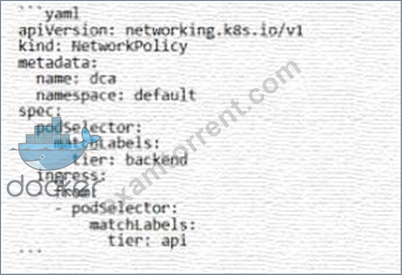
Will the networkPolicy BLOCK this trafftc?
Solution. a request issued from a pod bearing the tier: api label, to a pod bearing the tier: backend label
- A. Yes
- B. No
Answer: B
Explanation:
The provided Kubernetes NetworkPolicy YAML configuration indicates that the policy applies to pods with the label tier: backend in the default namespace1. The ingress rule allows traffic from pods with the label tier:
api1. Therefore, a request issued from a pod bearing the tier: api label to a pod bearing the tier: backend label will not be blocked by this networkPolicy1. This is because the networkPolicy explicitly allows ingress from pods with the tier: api label1. For more information on Kubernetes Network
NEW QUESTION # 118
The following Docker Compose file is deployed as a stack: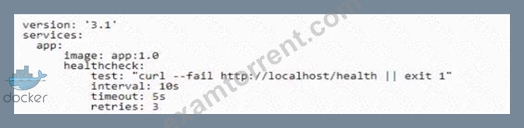
Is this statement correct about this health check definition?
Solution: Health checks test for app health ten seconds apart. Three failed health checks transition the container into "unhealthy" status.
- A. Yes
- B. No
Answer: A
NEW QUESTION # 119
How do you configure Docker engine to use a registry that is not configured with TLS certificates from a trusted CA?
- A. Set IGNORE_TLS in the 'daemon.json' configuration file.
- B. Pass the '--insecure.-registry' flag to the daemon at run time
- C. Set and export the IGNORE_TLS environment variable on the command line
- D. Set INSECURE_REGISTRY in the '/etc/docker/default' configuration file
Answer: B
NEW QUESTION # 120
......
Docker Certified Associate (DCA) exam is a certification program designed for IT professionals who want to demonstrate their expertise in creating, deploying, and managing Docker applications. Docker Certified Associate (DCA) Exam certification is recognized globally and is highly valued by organizations that use Docker technology in their operations. The DCA exam assesses the candidate's knowledge and skills in several areas, including Docker installation and configuration, Docker CLI commands, Docker Compose, Docker Swarm, and Docker security.
Latest 100% Passing Guarantee - Brilliant DCA Exam Questions PDF: https://www.examtorrent.com/DCA-valid-vce-dumps.html
DCA Certification – Valid Exam Dumps Questions Study Guide: https://drive.google.com/open?id=14Gc3FfGXABsiMG6A8xi0tTqeyNqqXV1d
