

Updated Jun-2026 Exam Engine or PDF for the 1z0-1065-25 Tests Free Updated Today!
Ultimate Guide to Prepare 1z0-1065-25 with Accurate PDF Questions
NEW QUESTION # 39
You are using the Responsive Self Service Procurement application and you want to review the list of current approvers of a requisition pending approval, but these are not displayed.
Which two could be reasons for the approvals not being displayed?
- A. Only the approvers can view the list of approvers.
- B. There are errors in retrieving approval details, or there could be any other infrastructure issues.
- C. The requisition is currently under edit by an approver.
- D. The approvals task flow has been initiated.
Answer: B,D
Explanation:
The Responsive Self Service Procurement application allows you to view the list of current approvers of a requisition that's pending approval. However, there are some scenarios where the approvals are not displayed.
One scenario is when the approvals task flow has been initiated, but not yet completed. In this case, the approvals are still being processed and the list of approvers is not yet available. Another scenario is when there are errors in retrieving approval details, or there could be any other infrastructure issues that prevent the display of approvals. In this case, you may see a message that says "Unable to retrieve approval details" or
"Approval details are not available".
:
View Current Approvers of a Requisition in the Responsive Self Service Procurement Application, Section 1:
"View Current Approvers of a Requisition in the Responsive Self Service Procurement Application" Get Started with the Responsive Self Service Procurement Application, Section 2: "Review Requisitions"
NEW QUESTION # 40
Challenge 2
Manage Business Unit
Scenario:
Your organization needs to establish a business unit to manage its procurement activities and assign it to the newly created purchasing location in Redwood City, CA.
Task 2
Create a new Business Unit for your purchasing organization, where you need to:
. Name the business unit as PRCXX Business Unit (Replace xx with 01, which is your allocated User ID.)
. Assign the location previously created
. Link to the USLOCS default set
Answer:
Explanation:
See below in Explanation for each Step.
Explanation:
To create a new Business Unit for your purchasing organization, you can follow these steps:
* Navigate to the Setup and Maintenance work area and search for the Manage Business Unit task.
* Click on the Go to Task icon to open the Manage Business Unit page.
* Click on the Create icon to create a new business unit.
* Enter the following information in the Create Business Unit dialog box:
* Name: PRC01 Business Unit
* Location: PRC01 Location
* Default Set: USLOCS
* Click on the Save and Close button to save the business unit.
You have successfully created a new business unit for your purchasing organization. You can verify the business unit details by searching for it in the Manage Business Unit page.
Or use the following Steps:
Following the scenario, we need to create a new Business Unit in Oracle Procurement Cloud for your purchasing organization and assign the previously created location in Redwood City, CA.
Here are the steps to create the Business Unit:
* Navigate to Manage Business Units:
* Go to the Global Navigation Menu.
* Click on Setup and Maintenance.
* Click on Business Units under Common Tasks.
* Create the Business Unit:
* Click on the Create icon (+ icon).
* Enter the Business Unit Information:
* Name: Enter "PRCXX Business Unit" (replace xx with 01).
* Default Location: Select "PRCXX Location" (replace xx with 01) from the dropdown list.
* Default Set: Select "USLOCS" from the dropdown list.
* Description: (Optional) Enter a brief description of the business unit.
* Save the Business Unit:
* Click on the Save button.
Verification:
* The Business Unit "PRCXX Business Unit" (replace xx with 01) should now be listed in the Manage Business Units page.
* You can verify the details of the business unit by clicking on it.
* The default location and set should be displayed as "PRCXX Location" (replace xx with 01) and
"USLOCS," respectively.
Additional Notes:
* Make sure to replace "xx" with your allocated User ID (01) in both the Business Unit name and code for consistent naming convention.
* Assigning the US Location Set to the Business Unit ensures that it inherits the legal entities, accounts, and other context information from that set.
NEW QUESTION # 41
In Supplier Qualification management, your customer notices failures in the automatic qualification process.
Where should they look for further information to correct these?
- A. Supplier Registration Infolet and Manage Supplier Registration pages
- B. Automation Errors Infolet and Manage Automation Errors pages
- C. Automation Rules Infolet and Manage Automation Rules pages
- D. Supplier Qualifications Infolet and Manage Supplier Qualifications pages
Answer: B
NEW QUESTION # 42
After users create a task, for example, by submitting items for approval, you can use the Transaction Manager to keep track of the workflow task. This can be used to review transactions when you need to, especially if something goes wrong.
Which three are possible statuses of transactions?
- A. Failed
- B. In Progress
- C. Error
- D. Stuck
- E. Warning
Answer: A,B,D
NEW QUESTION # 43
You should regularly run reports to protect against fraud.
Which task do you use to select the attributes to be monitored for a supplier model?
- A. Manage Transmission Configurations
- B. Manage Common Options for Payables and Procurement
- C. Configure Procurement Business function
- D. Manage Audit Policies
- E. Configure Supplier Registration and Profile Change Request
Answer: D
Explanation:
To select the attributes to be monitored for a supplier model, you use the Manage Audit Policies task in the Setup and Maintenance work area. This task allows you to enable auditing for various business objects, such as suppliers, supplier sites, supplier contacts, and supplier bank accounts. You can also select the attributes of each business object that you want to audit, such as supplier name, address, tax number, and so on. By enabling auditing, you can track the changes made to the supplier model and generate audit reports to protect against fraud.
:
Overview of Audit Configuration, Section 2.1: "Enable Auditing for Business Objects" Supplier Profile Audit History Setup and Reporting, Section 1: "Supplier Profile Audit History Setup and Reporting"
NEW QUESTION # 44
Procurement Contracts allows you to take control of your contract lifecycle, from authoring and negotiation through implementation, enforcement, evaluation, and closeout. Procurement experts can quickly author contracts that comply with corporate standards.
Which statement applies to Procurement Contracts?
- A. Contract authoring may only be accessed from Procurement Contracts.
- B. Contracts may be amended post approval.
- C. Approved contracts may not be amended.
- D. Digital signatures must be added.
Answer: B
NEW QUESTION # 45
uring discussions your client indicates that as they are a contract manufacturer, they need to execute supply chain activities in the context of projects.
In which offering can you opt in to a feature that enables this?
- A. Manufacturing and Supply Chain Materials Management
- B. Project Financial Management
- C. Project Execution Management
Answer: A
NEW QUESTION # 46
An electronics parts manufacturer has decided to implement only the Purchasing application from the Oracle Fusion Cloud Procurement pillar.
Which setup component will they NOT require for this implementation?
- A. Requisitioning Business Function
- B. Procurement Agents
- C. Document Style
- D. Cost Factors
- E. Change Order Template
Answer: D
Explanation:
Cost factors are used to identify charges associated with a negotiation line in addition to price, such as shipping and handling, retooling, or import duties. Cost factors are part of the Supplier Negotiation application, which is not required for implementing only the Purchasing application. The other options are all setup components that are needed for the Purchasing application.
:
Create Cost Factors
REST API for Oracle Fusion Cloud Procurement - External Cost Factors and External Cost Factors
NEW QUESTION # 47
Which two tasks can a customer perform in Functional Setup Manager when configuring setup data?
- A. Configuring Oracle Fusion Cloud applications to match business needs
- B. Collecting data to populate the Order Orchestration and Planning Data repository
- C. Setting up and maintaining data by means of the Manage Admin menu
- D. Importing and exporting data between instances
Answer: A,D
NEW QUESTION # 48
When creating a negotiation, the category manager wants to send it to all supplier contacts for a supplier.
Which is the most efficient way to achieve this?
- A. Create the negotiation by using a negotiation style with the appropriate supplier control selected.
- B. Create a negotiation by using a negotiation template with each supplier contact added.
- C. Create a negotiation and send it to the supplier bidder contact for forward distribution.
- D. Create a negotiation and add each supplier contact to it.
Answer: A
Explanation:
The most efficient way to send a negotiation to all supplier contacts for a supplier is to use a negotiation style that has the supplier control option of "All supplier contacts" enabled. This option allows you to automatically include all the contacts associated with a supplier when you add the supplier to the negotiation. You do not need to manually add each contact or rely on the supplier bidder contact to forward the negotiation. You can also create a negotiation template with this option enabled and use it to create a negotiation.
:
Examples of Negotiation Controls, Section 1: "Examples of Negotiation Controls", Subsection: "Supplier Controls" Create Supplier Negotiations from Template, Section 1: "Create Supplier Negotiations from Template"
NEW QUESTION # 49
Challenge 5
Manage Procurement Agents
Scenario:
Your procurement organization requires you to define yourself as a purchasing buyer so that you can create and manage procurement transactions.
Task
Define a Procurement Agent, where:
Procurement BU is US1 Business Unit
. Agent is mapped to your assigned Login username - Student, PRCXX (Replace xx with 01, which is your allocated User ID.)
All default procurement actions are to be assigned and accepted as-is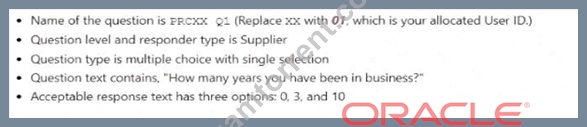
Answer:
Explanation:
See below in Explanation for each Step.
Explanation:
To define a Procurement Agent, you can follow these steps:
* Navigate to the Setup and Maintenance work area and search for the Manage Procurement Agents task.
* Click on the Go to Task icon to open the Manage Procurement Agents page.
* Click on the Create icon to create a new procurement agent.
* Enter the following information in the Create Procurement Agent dialog box:
* Procurement Business Unit: US1 Business Unit
* Agent: Student, PRC01
* Procurement Actions: Select all the check boxes to assign all the default procurement actions
* Click on the Save and Close button to save the procurement agent.
You have successfully defined a procurement agent. You can verify the procurement agent details by searching for it in the Manage Procurement Agents page. For more information on how to define and manage procurement agents, you can refer to the Define Procurement Agents (Oracle Fusion Cloud Procurement Implementation Guide) document.
Or the following steps:
Following the scenario, we need to define you (Student, PRCXX) as a Procurement Agent with access to manage procurement transactions in the US1 Business Unit.
Here are the steps to define the Procurement Agent:
* Navigate to Manage Procurement Agents:
* Go to the Global Navigation Menu.
* Click on Procurement.
* Click on Setup and Maintenance.
* Click on Procurement Agents.
* Create the Procurement Agent:
* Click on the Create icon (+ icon).
* Enter the Procurement Agent Information:
* Procurement BU: Select "US1 Business Unit".
* Agent: Enter your assigned Login username - "Student, PRCXX" (replace xx with 01).
* Requisitioning BU: (Optional) You can select a specific Requisitioning Business Unit if you primarily handle requests from that unit. Otherwise, leave it blank.
* Default Procurement Actions: Select "Use Defaults". This assigns all default procurement actions (create purchase orders, issue requisitions, etc.) to you.
* Save the Procurement Agent:
* Click on the Save button.
Verification:
* You should now be listed as a Procurement Agent in the Manage Procurement Agents page.
* You can verify your assigned actions and Business Units by clicking on your record.
* You should be able to create and manage procurement transactions within the US1 Business Unit.
Additional Notes:
* Make sure to replace "xx" with your allocated User ID (01) in the Agent field for accurate identification.
* Selecting "Use Defaults" assigns all standard procurement actions to you. You can customize these actions later if needed.
* Remember that your access level and permissions within the Procurement module will be determined by your Procurement Agent role and associated Business Units.
NEW QUESTION # 50
Your client wishes to use amount-based line items when they are ordering a service, for example, they might order $5000 of consulting services over the next year.
Which two fields can be defaulted in from the purchase order line?
- A. Functional Area
- B. Context Prompt
- C. Catalog
- D. Unit of Measure (UOM)
- E. Category Name
Answer: D,E
NEW QUESTION # 51
Your organization has its headquarters in India, and has three manufacturing facilities in Japan, Singapore, and Taiwan. The raw material requirements for these three manufacturing units are consolidated and procured from Japan.
How should you model this scenario in Oracle Fusion Cloud Procurement?
- A. Requisitioning Bus; India, Singapore, and Taiwan; Procurement BU: Japan
- B. Requisitioning Bus: India, Japan, and Taiwan; Procurement BU: India and Japan
- C. Requisitioning Bus; India, Japan, and Singapore; Procurement BU: Japan and Taiwan
- D. Requisitioning Bus: Japan, Singapore, and Taiwan; Procurement BU: Japan
Answer: D
NEW QUESTION # 52
Your customer has been reviewing previous negotiations and now wants to be able to evaluate supplier responses on more than just price.
Which other option can be used, together with price, to determine the supplier offer?
- A. External cost factors
- B. Internal cost factors
- C. Qualitative aspects
- D. Supplier eligibility
Answer: C
NEW QUESTION # 53
Your customer requires any approved requisition to be reapproved whenever a buyer updates a catalog requisition line during requisition processing.
How must they set this up?
- A. Configure the PO Approval rule in such a way that buyer-modified requisition lines will go for approval again.
- B. After requisition modification, a buyer needs to reassign the requisition line to the requisition authority for approval.
- C. In the Configure Requisitioning Business Function task, select "Approval required for buyer modified lines".
- D. Configure a Requisition Approval rule to include the "Approval required for buyer modified lines'' condition.
Answer: C
Explanation:
This option enables the customer to require any approved requisition to be reapproved whenever a buyer updates a catalog requisition line during requisition processing. This ensures that any changes made by the buyer are reviewed and approved by the appropriate authority before the requisition is converted to a purchase order.
:
Considerations for Setting Up Requisition Approval Task: This document explains the preconfigured requisition approval elements and how to configure requisition approval rules using the Manage Requisition Approvals task.
Overview of Managing Approvals and Notifications: This document provides an overview of the approval management framework and the approval rules management for procurement. It also describes the employee supervisor hierarchy approval rules and the user-defined attributes assignments and routing.
NEW QUESTION # 54
To streamline negotiation communication between organization and your suppliers, you have opted into the share enterprise contracts supplier feature in supplier portal?
- A. The contract is of sell intent.
- B. The contract is in amendment status
- C. The contract is in Draft status.
- D. The contract is in Active status.
- E. The contract is of Buy intent.
Answer: D,E
NEW QUESTION # 55
You have the following business requirements when creating an implementation project:
You want to see the list of offerings and functional areas that are configured for the project.
You want to identify at which stage all offerings and functional areas are.
Which two fulfill these requirements?
- A. After creating the implementation project, set the status of tasks to in Progress or Implemented.
- B. Although the offering configuration can be changed at any time, the changes will influence any existing implementation task lists.
- C. You need the IT Security role to fulfill these requirements.
- D. Select the Enable check box to specify the options.
- E. Change Provisioned to "No" to specify the offering that you want to select while creating an implementation project.
Answer: A,D
Explanation:
When you create an implementation project, you can select the offerings and functional areas that you want to implement by selecting the Enable check box for each option. This will generate a list of setup tasks for the selected options. You can also see the status of each offering and functional area, such as Provisioned, Enabled, or Not Enabled. After creating the implementation project, you can update the status of each task to indicate the progress of the implementation. You can set the status to In Progress, Implemented, or Not Applicable. This will help you to identify the stage of each offering and functional area in the implementation project.
:
How You Use Implementation Projects to Manage Setup
Oracle Fusion Applications Procurement Implementation Guide, Section 2.1: "Create Implementation Project"
NEW QUESTION # 56
Challenge 4
Manage Inventory Organizations
Scenario:
Your procurement organization requires you to create an inventory organization, which will be used for issuing and receiving procurement transactions.
Task:
Create an Inventory Organization to receive procurement transactions, where:
. Name of the organization is PRCXX Organization (Replace xx with 01, which is your allocated User ID.)
. Organization code is PRCXXORG (Replace xx with 01, which is your allocated User ID.)
. Organization is linked to US1 Business Unit, US1 Legal Entity, and Redwood City - CA location
. Item Master Organization is linked to Operations
. Item Grouping Behavior is set to Definition Organization
. Schedule is set to Operations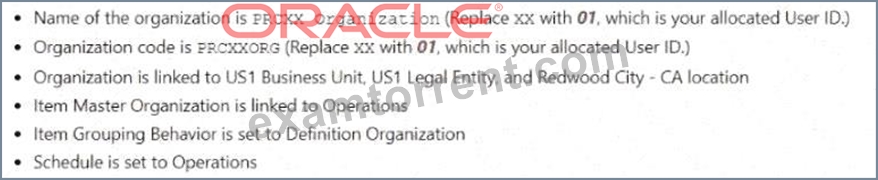
Answer:
Explanation:
See below in Explanation for each Step.
Explanation:
To create an Inventory Organization to receive procurement transactions, you can follow these steps:
* Navigate to the Setup and Maintenance work area and search for the Manage Inventory Organizations task.
* Click on the Go to Task icon to open the Manage Inventory Organizations page.
* Click on the Create icon to create a new inventory organization.
* Enter the following information in the Create Inventory Organization dialog box:
* Name: PRC01 Organization
* Code: PRC01ORG
* Business Unit: US1
* Legal Entity: US1
* Location: Redwood City - CA
* Item Master Organization: Operations
* Item Grouping Behavior: Definition Organization
* Schedule: Operations
* Click on the Save and Close button to save the inventory organization.
You have successfully created an inventory organization to receive procurement transactions. You can verify the inventory organization details by searching for it in the Manage Inventory Organizations page. For more information on how to create and manage inventory organizations, you can refer to the Inventory Organizations document.
Or use the following steps:
Following the scenario, we need to create a new Inventory Organization in Oracle Procurement Cloud named
"PRCXX Organization" (replace xx with 01) to receive procurement transactions.
Here are the steps to create the Inventory Organization:
* Navigate to Manage Inventory Organizations:
* Go to the Global Navigation Menu.
* Click on Supply Chain.
* Click on Setup and Maintenance.
* Click on Inventory Organizations.
* Create the Inventory Organization:
* Click on the Create icon (+ icon).
* Enter the Inventory Organization Information:
* Name: Enter "PRCXX Organization" (replace xx with 01).
* Organization Code: Enter "PRCXXORG" (replace xx with 01).
* Business Unit: Select "US1 Business Unit".
* Legal Entity: Select "US1 Legal Entity".
* Location: Select "Redwood City - CA".
* Item Master Organization: Select "Operations".
* Item Grouping Behavior: Select "Definition Organization".
* Schedule: Select "Operations".
* Description: (Optional) Enter a brief description of the inventory organization.
* Define Item Sourcing Details:
* Click on the Item Sourcing Details tab.
* Click on the Create icon (+ icon).
* Enter the item sourcing details for your organization, including:
* Picking Defaults
* Inventory Lead Time
* Supply Subinventory
* Shipping Rules
* Click on the Save and Close button.
* Save the Inventory Organization:
* Click on the Save button.
Verification:
* The Inventory Organization "PRCXX Organization" (replace xx with 01) should now be listed in the Manage Inventory Organizations page.
* You can verify the details of the organization by clicking on it.
* The linked Business Unit, Legal Entity, Location, Item Master Organization, Item Grouping Behavior, and Schedule should be displayed as specified above.
* Additionally, the Item Sourcing Details should reflect the defined values for picking, lead time, subinventory, and shipping rules.
Additional Notes:
* Make sure to replace "xx" with your allocated User ID (01) in both the Inventory Organization name and code for consistent naming convention.
* The Item Master Organization defines the organization responsible for managing item information.
* The Item Grouping Behavior determines how items are grouped for inventory purposes.
* The Schedule defines the calendar used for scheduling inventory transactions.
* Carefully review and configure the Item Sourcing Details to ensure proper receipt and fulfillment of procurement transactions within your organization.
NEW QUESTION # 57
How does the Al-enhanced spend classification process improve procurement efficiency?
- A. By enhancing accuracy in categorizing spend transactions
- B. By generating purchase requisitions
- C. By automating supplier negotiations
Answer: A
NEW QUESTION # 58
You have created several data security policies.
Which task in Setup and Maintenance should you use to apply the data security policies with conditions to users? (Double Check answer please)
- A. Manage Data Role and Security Profiles
- B. Manage Data Access for Users
- C. Manage Data Security Policies
- D. Manage Users
Answer: A
NEW QUESTION # 59
......
Pass Oracle With ExamTorrent Exam Dumps: https://www.examtorrent.com/1z0-1065-25-valid-vce-dumps.html
Fully Updated 1z0-1065-25 Dumps - 100% Same Q&A In Your Real Exam: https://drive.google.com/open?id=1QIuhpUlrawaXpkTcswHEwVzAq8wF0aRx
