

N10-007 PDF Exam Material 2021 Realistic N10-007 Dumps Questions
Updated CompTIA N10-007 Dumps – PDF & Online Engine
NEW QUESTION 97
An employee, who Is using a laptop connected to the wireless network. Is able to connect to the Internet but not to internal company resources. A systems administrator reviews the following information from the laptop: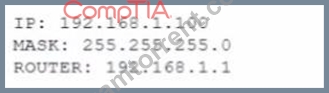
The administrator was expecting to see a network address within 10.100.0.0/23. which is consistent with the company's wireless network. The network administrator verifies the company's wireless network is configured and working properly. Which of the following is the MOST likely cause of this issue?
- A. Interference
- B. Wrong SSID
- C. Channel overlap
- D. Security type mismatch
Answer: D
NEW QUESTION 98
A company is allowing its employees to use their personal computers, tables, and loT devices while at work.
However, there are rules and guidelines to which employees must adhere. Which of the following documents applies to these employees?
- A. SOP
- B. SLA
- C. NDA
- D. BYOD
Answer: D
NEW QUESTION 99
A customer is reporting difficulty connecting some devices after replacing a wireless router with a new wireless
802.11ac router. The SSID, encryption and password are the same as the previous router. A technician goes on-site and notices the devices that are no longer connecting appear to be several years ago. Which of the following is MOST likely the problem?
- A. there is insufficient antenna power.
- B. there is a security type mismatch.
- C. there is a frequency mismatch.
- D. the password needs to be re-entered.
- E. the channel has changed.
Answer: C
NEW QUESTION 100
An administrator wants to implement an additional authentication factor to the remote SSH servers. Which of the following accomplishes this goal with the principle of "something you have"?
- A. Pattern
- B. Certificate
- C. Password
- D. Fingerprint
Answer: B
NEW QUESTION 101
Which of the following routing conventions is known as a link-state protocol?
- A. RIP
- B. OSPF
- C. EIGRP
- D. BGP
Answer: B
NEW QUESTION 102
Please refer to the attached exhibit. Which of the following types of configuration management documentation is represented?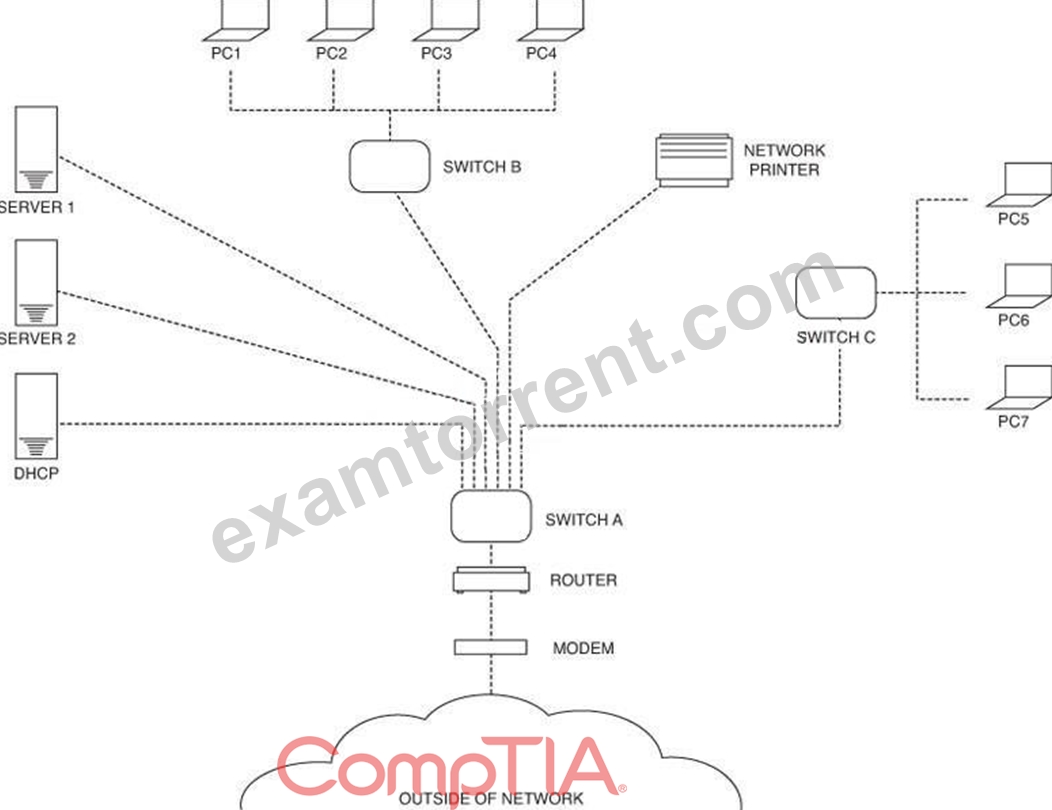
- A. Wiring schematic
- B. Network security policy
- C. Logical network diagram
- D. Network baseline
Answer: C
NEW QUESTION 103
Which of the following mediums is circuit switched?
- A. ATM
- B. PSTN
- C. MPLS
- D. Frame relay
Answer: B
NEW QUESTION 104
A technician is surveying college's network equipment room and connectivity. Which of the following types of documentation does the technician need perform a detailed site survey? (Select THREE).
- A. Change management documentation
- B. Standard operating procedure documentation
- C. Performance baseline documentation
- D. Rack diagram documentation
- E. Cable run label documentation
- F. IDF/MDF documentation
- G. network configuration documentation
Answer: B,D,E
NEW QUESTION 105
An administrator has added four switches to a campus network.
The switch in wiring closet A is only connected to the switch in wiring closet C.
The switch in wiring closet B is connected to the switch in wiring closet C as well as wiring closet D.
The switch in wiring closet D is only connected to the switch in wiring closet B.
Which of the following topologies is represented in this design?
- A. Bus
- B. Star
- C. Mesh
- D. Ring
Answer: A
NEW QUESTION 106
A network technician receives a request for a disaster recovery solution. Management has requested no downtime in the event of a disaster. Which of the following disaster recovery solutions is the appropriate choice?
- A. Virtual snapshot
- B. File backups
- C. Business continuity
- D. Hot site
Answer: A
NEW QUESTION 107
A company needs to create a new website for the delivery of secure content to and from specific customers.
The Chief Information Officer (CIO) states as a requirement the creation of a secure connection between the client's machine and the website every time the content is accessed. This should be accomplished without requiring the installation of any client software. Which of the following should be used in this scenario?
- A. Site-to-site VPN
- B. MPLS
- C. GRE
- D. SSL
Answer: A
NEW QUESTION 108
An administrator is upgrading the switches in the server room to support 10Gbps of throughput.
The switch will need to take advantage of the existing CAT6a lines that are run to each server.
Which of the following Ethernet standards should be used?
- A. 10GBaseER
- B. 10GBaseFX
- C. 10GBaseSR
- D. 10GBaseSW
- E. 10GBaseT
Answer: E
Explanation:
https://en.wikipedia.org/wiki/10_Gigabit_Ethernet#Standards
NEW QUESTION 109
A customer is reporting difficulty connecting some devices after replacing a wireless router with a new
wireless 802.11ac router. The SSID, encryption and password are the same as the previous router. A
technician goes on-site and notices the devices that are no longer connecting appear to be several years
ago. Which of the following is MOST likely the problem?
- A. there is insufficient antenna power.
- B. there is a security type mismatch.
- C. there is a frequency mismatch.
- D. the password needs to be re-entered.
- E. the channel has changed.
Answer: C
NEW QUESTION 110
A system administrator receives report from users of odd behavior in regard to recently installed server.
While reviewing the server network configuration, the systems administrator does both a forward and a reverse DNS lookup on the host, along with the network adapter configuration.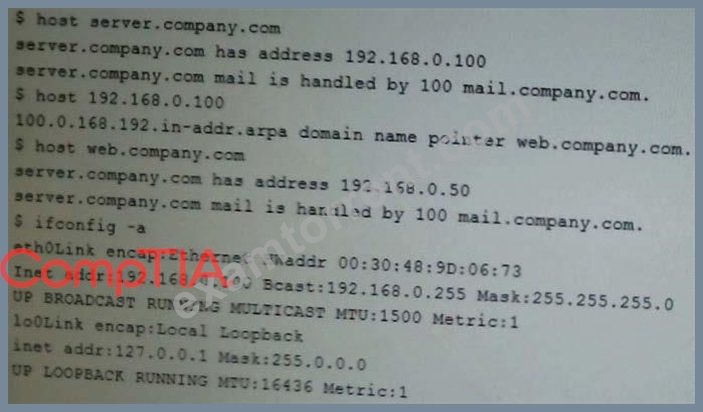
Which of the following is the problem identified in the output above?
- A. The DNS lookup entry is incorrectly configured.
- B. The server IP address is incorrectly configured.
- C. There is no reverse DNS entry for this host.
Answer: A
NEW QUESTION 111
You have been tasked with testing a CAT5e cable. A summary of the test results can be found on the screen.
Instructions
Step 1: Select the tool that was used to create the cable test results.
Step 2: Interpret the test results and select the option that explains the results. After you are done with your analysis, click the 'Submit' button.
If at any time you would like to bring back the initial state of the simulation, please click the Reset All button.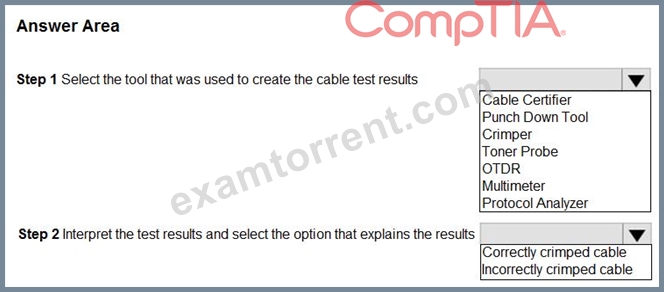
Answer:
Explanation: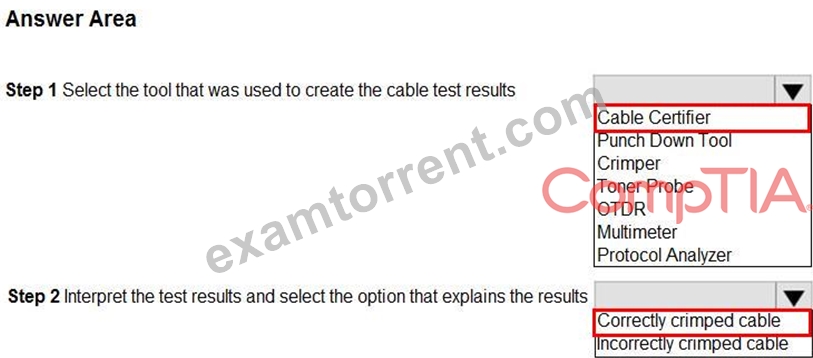
NEW QUESTION 112
The network team at a university, which has on-campus residences, recently expanded the WiFi offerings to the dormitories. Each dormitory houses approximately 75 students, who each have multiple wireless devices.
The WLAN utilizes an intelligent wireless controller for configuration and management. While the WiFi in academic buildings continues to receive few to no complaints, dormitory complaints are on the rise. Which of the following is MOST likely causing the complaints?
- A. Frequency mismatch
- B. Interference
- C. Channel overlap
- D. Crosstalk
Answer: C
NEW QUESTION 113
A network administrator wants to employ a username and password authentication system for guest WiFi.
Which of the following is the BEST option to provide this type of authentication?
- A. Network access control
- B. Port security
- C. Captive portal
- D. MAC filtering
Answer: C
NEW QUESTION 114
Ann, a network technician, has just installed a fiber switch in a datacenter. To run the fiber cabling, Ann plans the cable route over the top of the rack using the cable trays, down to the switch, coiling up any excess cable. As Ann configures the switch, she notices several messages in the logging buffer stating the receive signal of the SFP is too weak. Which of the following is MOST likely the cause of the errors in the logging buffer?
- A. Bend radius exceeded
- B. Fiber type mismatch
- C. Fiber cable mismatch
- D. Bad fiber switch
Answer: A
Explanation:
Explanation/Reference:
NEW QUESTION 115
A technician is setting up a public guest network for visitors to access the Internet that must be separate from the corporate network.
Which of the following are the BEST steps for the technician to take with minimum overhead configuration? (Choose two.)
- A. Enable SSID broadcasting to identify the guest network
- B. Ensure the access point is not running in mixed mode
- C. Configure visitor devices to use static IP addresses
- D. Enable two-factor authentication on visitor devices
- E. Configure the access point to use WPA2-AES encryption
Answer: A,E
Explanation:
You want your guests to be able to identify the correct Wi-Fi network and use a secure login which would be WPA2. Unless you want to sit there all day everyday and enter visitors IP addresses manually B does not make any sense then.
NEW QUESTION 116
A network technician needs to distribute an updated OS for all network switches at company locations throughout the world The technician wants to ensure file integrity since several locations do not have high-quality connectivity to the Internet. Which of the following methods should be used to distribute the images while ensuring integrity?
- A. Use an FTP server and provide the file hash
- B. Use a modem and dial-up connection
- C. Use a TFTP server and UDP protocol
- D. Use an HTTP server to share the file
Answer: C
NEW QUESTION 117
A network extension needs to be run to a location 500ft (152m) from the nearest switch. Which of the following solutions would work BEST? (Select TWO).
- A. Cat 7
- B. Cat 7 with a patch panel placed in the middle of the run
- C. Cat 6 with a repeater placed in the middle of the run
- D. Crossover cable
- E. Fiber-optic cabling
Answer: C,E
NEW QUESTION 118
......
The test checks one's skills and level of knowledge needed for carrying out activities such as the following:
- Incident response
- Threat analysis and blast radius analysis in collaboration with Security Operation
- Patch management
- Communications management
- Intrusion Prevention System (IPS) and Security Operations
- Network monitoring
- Troubleshooting, software/firmware installation, and updating of network elements
- Backup and storage
- Firewall management
- Performance, quality, and optimization reporting
CompTIA N10-007 Exam Syllabus Topics:
| Topic | Details |
|---|---|
Networking Concepts - 23% | |
| Explain the purposes and uses of ports and protocols. | 1.Protocols and ports
|
| Explain devices, applications, protocols and services at their appropriate OSI layers. | 1.Layer 1 – Physical 2. Layer 2 – Data link 3. Layer 3 – Network 4.Layer 4 – Transport 5. Layer 5 – Session 6.Layer 6 – Presentation 7.Layer 7 – Application |
| Explain the concepts and characteristics of routing and switching. | 1. Properties of network traffic
7.Port forwarding 8.Access control list 9. Distributed switching 10. Packet-switched vs. circuit switched network 11.Software-defined networking |
| Given a scenario, configure the appropriate IP addressing components. | 1.Private vs. public 2. Loopback and reserved 3.Default gateway 4. Virtual IP 5.Subnet mask 6. Subnetting
|
| Compare and contrast the characteristics of network topologies, types and technologies. | 1. Wired topologies
|
| Given a scenario, implement the appropriate wireless technologies and configurations. | 1.802.11 standards
2. Cellular
5.Channel bandwidth 6.Channel bonding 7.MIMO/MU-MIMO 8.Unidirectional/omnidirectiona 9.Site surveys |
| Summarize cloud concepts and their purposes. | 1.Types of services
4.Security implications/considerations 5. Relationship between local and cloud resources |
| Explain the functions of network services. | 1. DNS service
4.IPAM |
Infrastructure - 18% | |
| Given a scenario, deploy the appropriate cabling solution. | 1.Media types
3. Connector types
|
| Given a scenario, determine the appropriate placement of networking devices on a network and install/configure them. | 1.Firewall 2. Router 3. Switch 4. Hub 5.Bridge 6.Modems 7.Wireless access point 8. Media converter9. Wireless range extender 10.VoIP endpoint |
| Explain the purposes and use cases for advanced networking devices. | 1. Multilayer switch 2.Wireless controller 3. Load balancer4.IDS/IPS 5. Proxy server 6.VPN concentrator 7. AAA/RADIUS server 8.UTM appliance 9.NGFW/Layer 7 firewall 10. VoIP PBX 11.VoIP gateway 12. Content filter |
| Explain the purposes of virtualization and network storage technologies. | 1.Virtual networking components
|
| Compare and contrast WAN technologies. | 1. Service type
|
Network Operations - 17% | |
| Given a scenario, use appropriate documentation and diagrams to manage the network. | 1.Diagram symbols 2. Standard operating procedures/ work instructions 3.Logical vs. physical diagrams 4. Rack diagrams 5. Change management documentation 6. Wiring and port locations 7.IDF/MDF documentation 8.Labeling 9. Network configuration and performance baselines 10.Inventory management |
| Compare and contrast business continuity and disaster recovery concepts. | 1.Availability concepts
4. MTBF 5.SLA requirements |
| Explain common scanning, monitoring and patching processes and summarize their expected outputs. | 1.Processes
2.Event management
|
| Given a scenario, use remote access methods. | 1. VPN
2. RDP
8.Out-of-band management
|
| Identify policies and best practices. | 1.Privileged user agreement 2.Password policy 3.On-boarding/off-boarding procedures 4.Licensing restrictions 5.International export controls 6. Data loss prevention 7.Remote access policies 8.Incident response policies 9.BYOD 10.AUP 11.NDA 12. System life cycle
13.Safety procedures and policies |
Network Security - 20% | |
| Summarize the purposes of physical security devices. | 1. Detection
|
| Explain authentication and access controls. | 1. Authorization, authentication and accounting
|
| Given a scenario, secure a basic wireless network. | 1.WPA 2. WPA2 3.TKIP-RC4 4.CCMP-AES 5.Authentication and authorization
6.Geofencing |
| Summarize common networking attacks. | 1.DoS
3. Insider threat 4. Logic bomb 5.Rogue access point 6. Evil twin 7.War-driving 8. Phishing 9.Ransomware 10.DNS poisoning 11.ARP poisoning 12. Spoofing 13.Deauthentication 14. Brute force 15.VLAN hopping 16. Man-in-the-middle 17.Exploits vs. vulnerabilities |
| Given a scenario, implement network device hardening. | 1.Changing default credentials 2.Avoiding common passwords 3. Upgrading firmware 4.Patching and updates 5.File hashing 6.Disabling unnecessary services 7.Using secure protocols 8.Generating new keys 9.Disabling unused ports
|
| Explain common mitigation techniques and their purposes. | 1. Signature management 2.Device hardening 3.Change native VLAN 4. Switch port protection
7. File integrity monitoring 8.Role separation 9. Restricting access via ACLs 10.Honeypot/honeynet 11.Penetration testing |
Network Troubleshooting and Tools - 22% | |
| Explain the network troubleshooting methodology. | 1. Identify the problem
5. Implement the solution or escalate as necessary 6. Verify full system functionality and, if applicable, implement preventive measures 7. Document findings, actions, and outcomes |
| Given a scenario, use the appropriate tool. | 1. Hardware tools
|
| Given a scenario, troubleshoot common wired connectivity and performance issues. | 1.Attenuation 2.Latency 3. Jitter 4. Crosstalk 5. EMI 6.Open/short 7.Incorrect pin-out 8. Incorrect cable type 9.Bad port 10. Transceiver mismatch 11.TX/RX reverse 12. Duplex/speed mismatch 13.Damaged cables 14.Bent pins 15.Bottlenecks 16. VLAN mismatch 17. Network connection LED status indicators |
| Given a scenario, troubleshoot common wireless connectivity and performance issues. | 1. Reflection 2.Refraction 3.Absorption 4.Latency 5.Jitter 6. Attenuation 7.Incorrect antenna type 8.Interference 9.Incorrect antenna placement 10.Channel overlap 11.Overcapacity 12. Distance limitations 13. Frequency mismatch 14. Wrong SSID 15.Wrong passphrase 16.Security type mismatch 17. Power levels 18. Signal-to-noise ratio |
| Given a scenario, troubleshoot common network service issues. | 1. Names not resolving 2.Incorrect gateway 3.Incorrect netmask 4.Duplicate IP addresses 5.Duplicate MAC addresses 6.Expired IP address 7. Rogue DHCP server 8.Untrusted SSL certificate 9.Incorrect time 10.Exhausted DHCP scope 11.Blocked TCP/UDP ports 12. Incorrect host-based firewall settings 13.Incorrect ACL settings 14.Unresponsive service 15.Hardware failure |
CompTIA N10-007 Dumps PDF Are going to be The Best Score: https://www.examtorrent.com/N10-007-valid-vce-dumps.html
N10-007.pdf - Questions Answers PDF Sample Questions Reliable: https://drive.google.com/open?id=1dxS_e0aQc0mIrV76cpEGWZm6GJiO8-Ef
