


Employers hiring for technical roles increasingly look for proof of skills, and a certification is one of the clearest proofs available. ExamTorrent helps you earn that proof for the Autodesk Certified Professional: AutoCAD for Drafting and Design exam with 99 verified practice questions.
Autodesk ACP-01101 Exam Overview:
| Certification Vendor: | Autodesk |
|---|---|
| Exam Name: | Autodesk Certified Professional in AutoCAD for Design and Drafting |
| Exam Number: | ACP-01101 |
| Exam Duration: | 120 minutes |
| Available Languages: | English, Italian, Chinese Simplified, Korean, Japanese, French, German, Spanish |
| Related Certifications: | Autodesk Certified User: AutoCAD |
| Certificate Validity Period: | 3 years |
| Real Exam Qty: | 45-60 |
| Exam Format: | Drag and drop, Multiple choice, Simulation, Hotspot, Multiple select |
| Passing Score: | 87% |
| Exam Price: | USD 200 |
| Recommended Training: | AutoCAD for Design and Drafting Professional Certification Prep Autodesk Official Training Guides |
| Exam Registration: | PSI Testing Services Autodesk Certification Portal |
| Sample Questions: |  |
| Exam Way: | Online proctored or onsite at authorized testing centers |
| Pre Condition: | Recommended 400–1200 hours of hands-on AutoCAD experience; no mandatory prerequisite exam |
| Official Syllabus URL: | https://www.autodesk.com/certification/all-certifications/autocad-design-drafting-professional |
Autodesk ACP-01101 Exam Syllabus Topics:
| Section | Weight | Objectives |
|---|---|---|
| Topic 1: Author and Edit Drawing Content | 29% | - Manage blocks, attributes, and dynamic blocks - Use precision drafting tools - Edit objects using grips and advanced editing commands - Create and modify 2D geometry |
| Topic 2: Collaboration | 13% | - Attach and manage external references (XREFs) - Use underlays and data links - Manage drawing sets and collaboration tools |
| Topic 3: Design Annotation and Detailing | 20% | - Apply dimensions and dimension styles - Use leaders, tables, and hatching - Create and manage text and multiline text - Work with annotative scaling |
| Topic 4: Application and Drawing Management | 22% | - Manage layers, properties, and filters - Manage drawing settings and templates - Query and modify object properties - Use coordinate systems and navigation tools |
| Topic 5: Configure and Manage Design Output | 16% | - Set up plotting and publishing parameters - Export drawings to different file formats - Create and manage layouts and viewports |
ACP-01101 Practice Questions: Answers
The Autodesk Certified Professional: AutoCAD for Drafting and Design exam requires a score of 87% to pass, and the official registration fee is USD 200. Knowing both numbers before you register keeps your preparation budget realistic.
The Autodesk Certified Professional: AutoCAD for Drafting and Design practice questions are organized around the official exam objectives. Key topics include:
- Application and Drawing Management (22%)
- Design Annotation and Detailing (20%)
- Collaboration (13%)
A systematic pass through these topics covers the syllabus end to end.
You can register for the Autodesk Certified Professional: AutoCAD for Drafting and Design exam through the official channels:
Recommended 400–1200 hours of hands-on AutoCAD experience; no mandatory prerequisite exam
You can confirm the current eligibility requirements on the official ACP-01101 exam page before you register.
Our experts review the question bank every day, and whenever a new version is released, our system sends it to your email automatically — no request needed. If an update ever seems to go missing, check your junk or spam folder first, since automated messages occasionally land there; contact us if it truly never arrived.
Many candidates combine practice questions with official training. Recommended options include:
The Autodesk Certified Professional: AutoCAD for Drafting and Design exam contains 45-60 questions, and you will have 120 minutes minutes to complete them. Practicing under these exact constraints makes the real exam feel like one more rehearsal.
Yes. If anything about the updated material or your preparation is unclear, you can contact our experts directly after purchase. They will work through your question and offer professional advice on how to approach the material, so the product comes with guidance, not just files.
This package includes 99 practice questions for the Autodesk Certified Professional: AutoCAD for Drafting and Design exam. Every answer is verified by an experienced team of experts, so you can trust what you study.
Autodesk Certified Professional: AutoCAD for Drafting and Design Sample Questions:
Exhibit.
A CAD designer is using the AutoCAD Count tool to quantify the number of DR-36 door blocks that are in the drawing. A yellow error alert triangle appears next to the total count for the DR-30 block when selecting the item from the count list as shown in me exhibit.
Which oi these conditions would result in the alert tor the block highlighted in red?
- A. The block is exploded
- B. The block does not nave its color assigned to BYLAYCR.
- C. The block has a different scale factor
- D. The block Is on the wrong layer
Correct Answer: A 🗳️
Explanation: Only visible for ExamTorrent members. You can sign-up / login (it's free).
With an associative array selected as shown in the exhibit, which command will separate the objects into individual objects?
- A. Break
- B. Explode
- C. Ungroup
- D. Disassociate
Correct Answer: B 🗳️
Explanation: Only visible for ExamTorrent members. You can sign-up / login (it's free).
Refer to exhibit.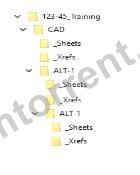
An alternate design option toider (ALT-1) is created with a copy of the original files.
The sheets for the alternate design should reference the drawings in the Al T-1 _Xrefs folder To make sure that the host drawings in the ALT-1 drawings display the correct reference files without errors, which of the following settings should do applied to the xrefs?
- A. Make Absolute
- B. Overlay
- C. Make Relative
- D. Attach
Correct Answer: C 🗳️
Explanation: Only visible for ExamTorrent members. You can sign-up / login (it's free).
You need to convert the two sets of parallel lines shown in 1 into the objects shown in 2 without repeating the command.
What should you use?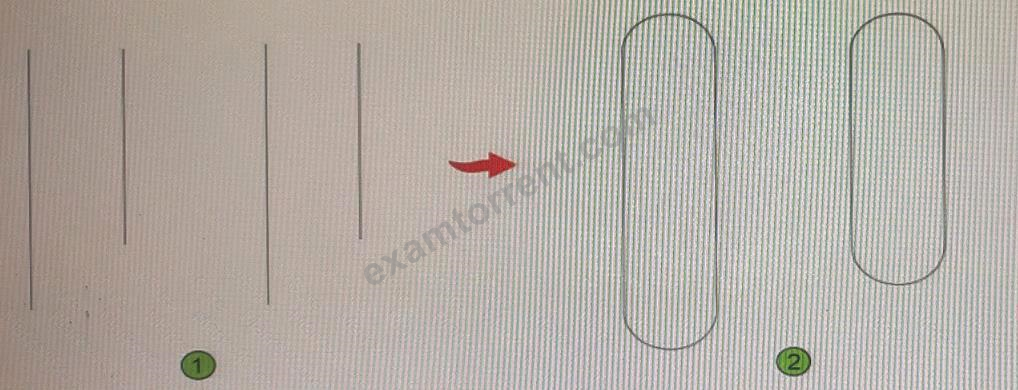
- A. The FILLET command with the Polyline option
- B. The FILLET command with the Multiple option
- C. The CHAMFER command with the Polyline option
- D. The CHAMFER command with the Multiple option
Correct Answer: D 🗳️
Explanation: Only visible for ExamTorrent members. You can sign-up / login (it's free).
You need to configure the layout viewports shown in the exhibit.
Which three methods can you use to create the viewports in a layout tab? (Select 3)
- A. Create individual viewports by using the MVIEW command.
- B. From the View Manager dialog box, generate named views and add them as layout viewpoints.
- C. Create a new page setup.
- D. Clip a viewport to multiple different shapes by using the VPCLIP command.
- E. From the Viewports dialog box: select a viewport configuration.
Correct Answer: A,B,E 🗳️
Explanation: Only visible for ExamTorrent members. You can sign-up / login (it's free).
Viewing page 1 out of 20 pages.
Viewing questions 1-5 out of 99 questions.



 Wendy
Wendy 
 Ingemar
 Humphrey
  Regina
  Gustave
  Una
Una  Orville
 Quentin
  Armand
  Jack
Jack  Jonathan
  Clark
Clark 


