


A certificate does more than decorate a resume — it widens your choices. Preparing for the C_ADBTP exam with ExamTorrent's 10+ Q&As covering the SAP Administrating SAP Business Technology Platform(C_ADBTP_2601) objectives is a practical step toward more opportunities and a broader future.
SAP C_ADBTP Exam Overview:
| Certification Vendor: | SAP |
|---|---|
| Exam Name: | Administrating SAP Business Technology Platform |
| Exam Number: | C_ADBTP |
| Passing Score: | 60-70% |
| Exam Format: | System-Based Assessment, Simulation Tasks, Scenario-Based |
| Real Exam Qty: | 40-80 |
| Exam Duration: | 120 minutes |
| Certificate Validity Period: | 12 months |
| Related Certifications: | SAP Certified Professional - Solution Architect - SAP Business Technology Platform |
| Exam Price: | $578 USD |
| Available Languages: | English |
| Recommended Training: | SAP Learning Journey: Administrating SAP Business Technology Platform |
| Exam Registration: | Pearson VUE SAP Training & Certification Shop |
| Sample Questions: |  |
| Exam Way: | Online proctored or onsite at authorized test centers |
| Pre Condition: | No mandatory prerequisites; recommended basic knowledge of cloud concepts and SAP BTP |
| Official Syllabus URL: | https://training.sap.com/certification/C_ADBTP_2601-sap-certified-associate-sap-btp-administrator/ |
SAP C_ADBTP Exam Syllabus Topics:
| Section | Weight | Objectives |
|---|---|---|
| Topic 1: Platform Connectivity and Integration | 15% | - Connectivity service and destinations - Cloud Connector setup and operation - Hybrid and cross-environment integration |
| Topic 2: DevOps and Governance | 10% | - Cost management and usage analytics - Automation and infrastructure as code - Lifecycle and change management |
| Topic 3: Operations, Monitoring and Security | 15% | - Logging, monitoring and alerting setup - Security configuration and compliance - Backup, restore and high availability |
| Topic 4: Identity and Access Management | 20% | - Trust configuration and authentication flows - User, role and role collection management - SAP Cloud Identity Services (IAS, IPS) |
| Topic 5: Environment and Service Management | 20% | - Service provisioning, subscriptions and lifecycle - Cloud Foundry, Kyma and ABAP environments - Runtime management and application operations |
| Topic 6: SAP BTP Architecture and Account Management | 20% | - Global account, directory and subaccount structure - Quotas, resource management and governance - Entitlement management and service allocation |
C_ADBTP Questions Answered: Format, Cost, and Prep
Immediately after checkout, your download link appears on screen and an automatic email with the materials lands in your inbox in about a minute. You can install the software on as many devices as you need, and if the email has not arrived within two hours, our support team will step in. Every purchase includes 365 days of free updates — each revision is compiled in step with current exam trends and emailed to you automatically — followed by a 50% renewal discount when the period ends.
A professional team, for one thing. Our experts compile the C_ADBTP bank in step with current exam trends, every answer is expert-verified, and there are no amateurs in the group — career-elite advisors also stand by with progress advice when you need direction. Just as important is the relationship: we stay in close contact with users, fold their feedback into every revision, and back each SAP Administrating SAP Business Technology Platform(C_ADBTP_2601) purchase with a free demo, 365 days of free updates, and a clearly stated refund policy.
SAP points candidates toward these official training options:
Combine a course that fits your schedule with regular question practice for the steadiest progress.
SAP sets the following prerequisites for the SAP Administrating SAP Business Technology Platform(C_ADBTP_2601): No mandatory prerequisites; recommended basic knowledge of cloud concepts and SAP BTP.
Confirm the current requirements on the official certification page before booking.
The SAP Administrating SAP Business Technology Platform(C_ADBTP_2601) blueprint is organized into these main domains:
- SAP BTP Architecture and Account Management (20%)
- Operations, Monitoring and Security (15%)
- Platform Connectivity and Integration (15%)
Further domains complete the official outline, and our question bank spans all of them.
Registration runs through the official channels listed here:
Choose a test center or online appointment that fits your calendar, and book ahead to lock in your preferred date.
We take responsibility for our materials. If you fail the corresponding exam within 60 days of purchase, send us a scanned copy of your enrollment slip and your official Score Report PDF within two days of the exam date, and we will process a full refund within seven days of verification. Please note the exclusions: exams taken within three days of purchase are not eligible, the candidate name must match the payer, and free or expired products are not covered. If you would rather switch direction, we can exchange your product for two others of equal value instead.
According to the latest exam information, the C_ADBTP exam contains 40-80 questions and runs for 120 minutes minutes. Timing yourself during practice sessions is a smart habit — pacing problems sink more candidates than knowledge gaps.
At present, the passing score for the C_ADBTP exam is 60-70% and the registration fee is $578 USD. Both figures are set by SAP and can change, so double-check them on the official site when you register.
SAP Administrating SAP Business Technology Platform(C_ADBTP_2601) Sample Questions:
SIMULATION
Create a Service Instance in Cloud Foundry
Enable a service instance of the HTLM5 Application Repository Service for Cloud Foundry.
Create a Service Instance in a Cloud Foundry Environment
In your SAP BTP cockpit, in the EU HCM Dev subaccount, create the service instance html5-eu-hcm-dev for the HTLM5 Application Repository Service with the service plan app-host in the Cloud Foundry space activity-recording
Correct Answer:
See the Explanation below for complete solution.
Explanation:
Before you start
Log in to SAP BTP Cockpit.
Open the correct Global Account.
Go to Directories.
Open Human Resources.
Open the EU HCM Dev subaccount.
This matters because the task must be completed in EU HCM Dev, and the service instance must be created in the specific Cloud Foundry space activity-recording. SAP Help also confirms that the HTML5 Application Repository is used in the Cloud Foundry environment and that the app-host plan is the host service used to store HTML5 application content.
Step 1 - Open the Cloud Foundry space
In EU HCM Dev, go to:
Cloud Foundry
Spaces
Select the space:
activity-recording
SAP Help describes creating Cloud Foundry service instances by first navigating to the subaccount, opening Cloud Foundry Spaces, selecting the target space, and then using that space's Services > Service Instances are a.
Step 2 - Open Service Instances in the space
Inside the activity-recording space, go to:
Services
Service Instances
This is the Cloud Foundry-space-level location used for creating service instances in that space.
Step 3 - Start creating the new instance
Click Create.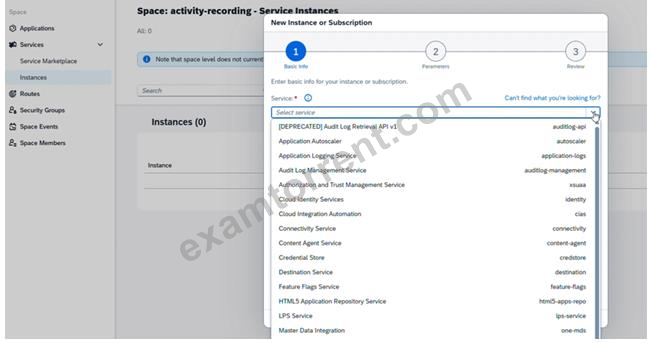
A wizard opens for the new service instance. SAP Help describes this as the standard cockpit flow for creating service instances in Cloud Foundry spaces.
Step 4 - Choose the required service
In the service selection, choose:
HTML5 Application Repository Service
SAP Help documents the HTML5 Application Repository as the service used for centrally storing HTML5 applications' static content on SAP BTP in the Cloud Foundry environment.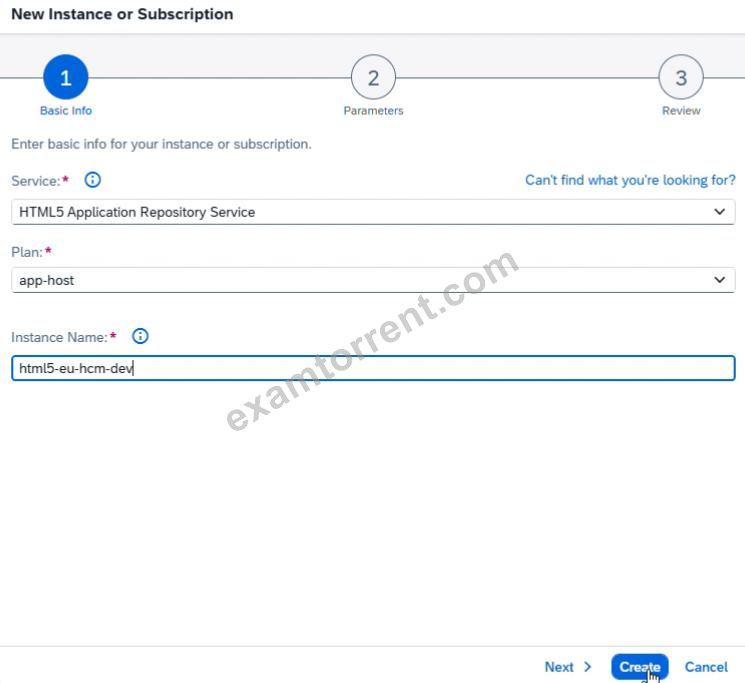
Step 5 - Choose the required service plan
Select the service plan:
app-host
SAP Help states that the app-host service plan is used to deploy applications to the HTML5 Application Repository.
Step 6 - Enter the instance name
Set the service instance name to:
html5-eu-hcm-dev
Then continue and confirm creation.
SAP Help recommends using a CLI-friendly name for service instances, and the task gives the exact required name.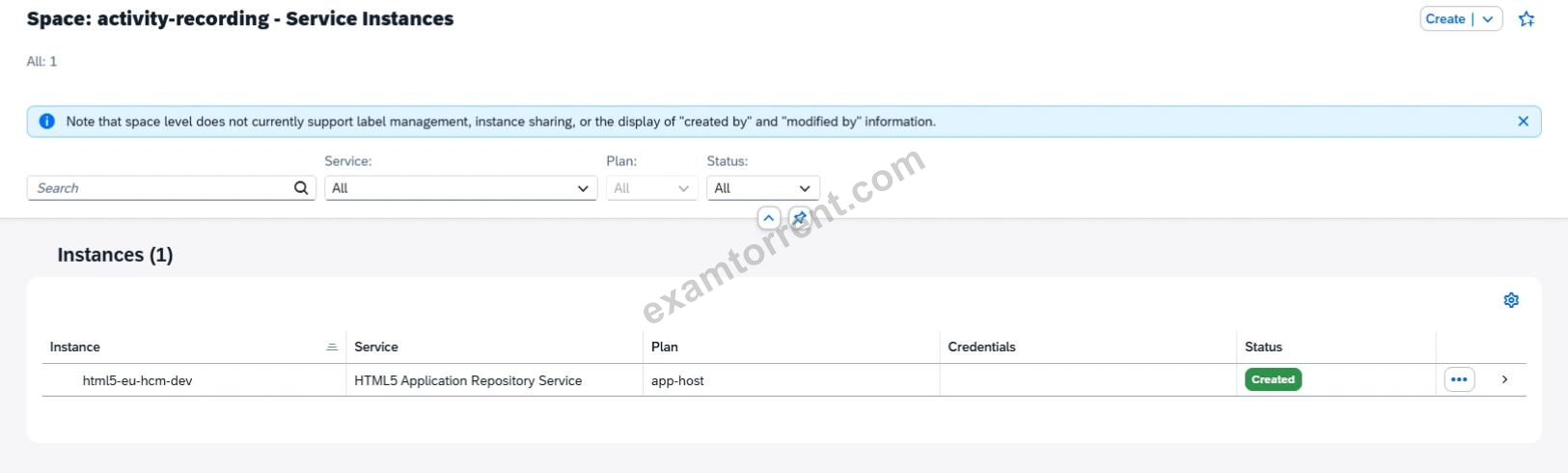
Step 7 - Verify the space is correct
Before final confirmation, verify the target Cloud Foundry space is:
activity-recording
This is important because Cloud Foundry service instances are created within a specific space, not only at the subaccount level.
Step 8 - Create and confirm
Click Create or Finish.
Wait for the status to change from in-progress to created.
SAP Help notes that after creation, the instance appears in the service instances table and its status can be checked there.
Final expected result
Inside EU HCM Dev, in Cloud Foundry space activity-recording, you should have a service instance with:
Service: HTML5 Application Repository Service
Plan: app-host
Instance Name: html5-eu-hcm-dev
Common mistakes to avoid
Creating the instance in the wrong subaccount; it must be EU HCM Dev.
Creating it in the wrong Cloud Foundry space; it must be activity-recording.
Choosing the wrong service; use HTML5 Application Repository Service.
Choosing the wrong plan; use app-host. SAP Help specifically links app-host with hosting deployed HTML5 app content.
Typing the wrong instance name; use exactly html5-eu-hcm-dev.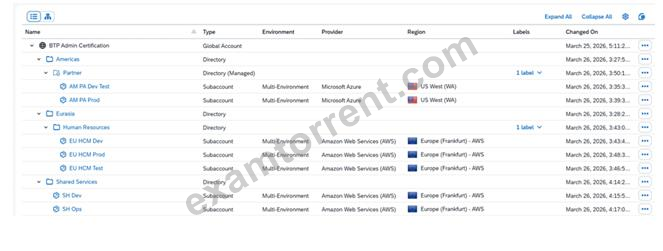
Viewing page 1 out of 10 pages.
Viewing questions 1-1 out of 10 questions.


 Adrian

 Joshua

 John

 Jean
 Ingrid
 Leo
 Teresa
 Beacher
 Malcolm
 Carr
 Dana
 Ward
 Hugo
 Jo
 Alberta


