


Actual test questions can't stay the same forever — our experts check the exam database every day and update timely. The SAP Certified Implementation Consultant - SAP S/4HANA Cloud Private Edition, Asset Management (C_S43_2601) torrent at ExamTorrent: 12 practice questions for the C_S43_2601 exam in 2026.
SAP C_S43_2601 Exam Overview:
| Certification Vendor: | SAP |
|---|---|
| Exam Name: | SAP Certified Implementation Consultant - SAP S/4HANA Cloud Private Edition, Asset Management |
| Exam Number: | C_S43_2601 |
| Available Languages: | English |
| Exam Format: | Scenario-Based Tasks, System-Based Assessment |
| Certificate Validity Period: | Current SAP release cycle |
| Passing Score: | 60% |
| Related Certifications: | SAP Certified Associate - SAP S/4HANA Cloud Private Edition, Asset Management |
| Exam Duration: | 180 minutes |
| Real Exam Qty: | 80 |
| Exam Price: | $218 USD |
| Sample Questions: |  |
| Exam Way: | Online proctored exam or test center delivery |
| Pre Condition: | Basic knowledge of SAP S/4HANA Asset Management and business processes is recommended. |
| Official Syllabus URL: | https://learning.sap.com/certifications/sap-certified-associate-sap-s-4hana-cloud-private-edition-asset-management |
SAP C_S43_2601 Exam Syllabus Topics:
| Section | Weight | Objectives |
|---|---|---|
| User Interface and User Experience | 10% or less | - SAP Fiori Applications
|
| Preventive Maintenance | 11% - 20% | - Maintenance Planning
|
| Managing Clean Core | 10% or less | - Clean Core Principles
|
| Maintenance Processing - Basic Functions | 11% - 20% | - Maintenance Notifications
|
| Organizational Units and Master Data | 11% - 20% | - Enterprise Structure
|
| Maintenance Processing - Advanced Functions | 11% - 20% | - Advanced Maintenance Scenarios
|
| Technical Objects | 11% - 20% | - Equipment and Functional Locations
|
C_S43_2601 Exam FAQ — No Waiting
At the first moment after payment, our system sends the downloading link, account, and password to your email box — about a minute; remember to check your email box after payment, and contact our 24-hour service if nothing arrives within 2 hours. If you fail the corresponding C_S43_2601 exam within 60 days of purchase, we refund the full amount: send a scanned enrollment slip plus the official Score Report PDF within 2 days of the exam, processed within 7 days. Excluded: exams within 3 days of purchase, candidate names that don't match the payer, and free or expired products. Or exchange for two equal-value products free.
$218 USD per attempt, 60% to pass. Retakes cost the full fee — make the attempt count with the 12 practice questions for the C_S43_2601 exam at ExamTorrent.
Basic knowledge of SAP S/4HANA Asset Management and business processes is recommended. Eligibility rules change over time, so verify the current requirements on the official page (official C_S43_2601 exam page) before registering.
The SAP Certified Implementation Consultant - SAP S/4HANA Cloud Private Edition, Asset Management (C_S43_2601) is SAP's certification exam for SAP Certified Application Associate, at the Associate level. The certificate is an indispensable credential in this field. Related credentials include SAP Certified Associate - SAP S/4HANA Cloud Private Edition, Asset Management.
Yes — download the free SAP Certified Implementation Consultant - SAP S/4HANA Cloud Private Edition, Asset Management (C_S43_2601) demo before purchase; the full book torrent is better still. Purchases include 365 days of free updates by email; renew afterward at 50% off.
The SAP Certified Implementation Consultant - SAP S/4HANA Cloud Private Edition, Asset Management (C_S43_2601) blueprint spans 7 domains — including User Interface and User Experience (10% or less), Maintenance Processing - Basic Functions (11% - 20%), Managing Clean Core (10% or less). Our experts check the exam database daily to keep pace; the complete outline above lists every subtopic.
180 minutes for 80 questions. Download immediately after payment and put the saved time into timed practice with the ExamTorrent engine.
SAP Certified Implementation Consultant - SAP S/4HANA Cloud Private Edition, Asset Management (C_S43_2601) Sample Questions:
Create a Task List
The project team evaluates during the implementation project Task Lists in SAP S/4HANA Asset Management. The following features need to be checked:
* Create a Task List header
* Create Task List operations
* Create a Task List with 3 Task List operations. Maintenance Strategy Z## comprises Maintenance Packages with different hierarchy levels.
Use the following information at header level of the Task List: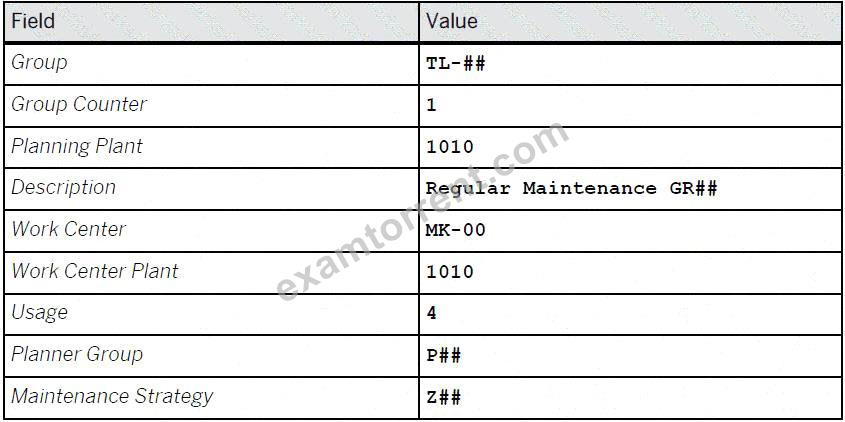
Use the following information for each Task List operation: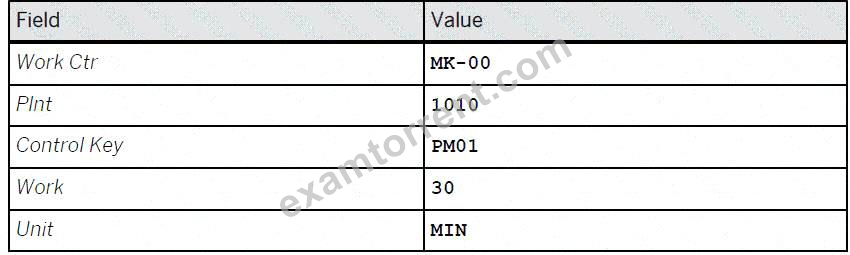
* Assign Maintenance Packages to the Task List Operations as follows:
* Operation 10 is to be performed monthly.
* Operation 20 is to be performed every 4 months.
* Operation 30 is to be performed every 12 months.
Correct Answer:
See the Explanation for complete Solution of this Task.
Explanation:
Since we encountered that error with the Z48 strategy , we must ensure that is fixed before we can finish the Task List. Here is the complete, verified, step-by-step process to finalize Task 7 , including the "hidden" pre- requisite.
Task 7: Create a General Task List
Objective : To create a standardized template of maintenance steps that can be automatically pulled into future work orders based on a schedule.
Step 1: The Pre-requisite (Fixing Strategy Z48)
If you haven't done this yet, SAP will not let you save the Task List.
* Transaction : IP11 (Maintain Maintenance Strategies).
* Action : Click New Entries .
* Strategy : Z48
* Description : Strategy for Group 48
* Strategy Unit : MON (Months).
* Packages : On the left, double-click Packages , then click New Entries :
* Line 1 : Cycle 1 / Unit MON / Text Monthly
* Line 2 : Cycle 4 / Unit MON / Text Every 4 Months
* Line 3 : Cycle 12 / Unit MON / Text Yearly
* Save (Floppy Disk icon).
Explanation : A strategy is the "calendar" that defines how often work happens. Without this, the system doesn't know what "Monthly" or "Yearly" means.
Step 2: Create Task List Header
* Transaction : IA05 .
* Initial Screen : Group TL-48, Group Counter 1. Press Enter .
* Header Fields :
* Description : Regular Maintenance GR48
* Planning Plant : 1010
* Work Center : MK-00 / Plant : 1010
* Usage : 4 (Plant Maintenance)
* Status : 4 (Released)
* Planner Group : P48
* Maint. Strategy : Z48
Explanation : The header defines who is responsible for the work (Planner Group P48) and which scheduling rules (Strategy Z48) apply to the whole list.
Step 3: Create Operations
* Click the Operations button (F6) at the top.
* Enter three rows with this data:
* Op 10 : Work Center MK-00, Plant 1010, Control Key PM01, Work 30, Unit MIN.
* Op 20 : (Same as above).
* Op 30 : (Same as above).
Explanation : Operations are the actual steps the technician follows. Here, we are saying each step takes 30 minutes of mechanical labor.
Step 4: Assign Maintenance Packages (The "Frequencies")
This is the most important part of Task 7. We tell SAP which operation happens when.
* Select Row 10 (click the box at the far left of the row).
* Go to Menu: Goto > Maintenance Packages .
* Check the box for the 1 Month package. Click the Back (Green Arrow) icon.
* Select Row 20 .
* Go to Goto > Maintenance Packages and check the 4 Month package. Click Back .
* Select Row 30 .
* Go to Goto > Maintenance Packages and check the 12 Month package. Click Back .
Explanation : Now, SAP knows that Op 10 happens every month, but Op 30 only happens once a year.
Step 5: Save
* Click the Save icon.
* The message at the bottom should say: "Task list TL-48 saved with group counter 1" .
Create a Maintenance Plan
The project team evaluates during the implementation project Maintenance Plans in SAP S/4HANA Asset Management. The following features need to be checked:
Create a Maintenance Plan
Create a Maintenance Plan and save it. Use the following information: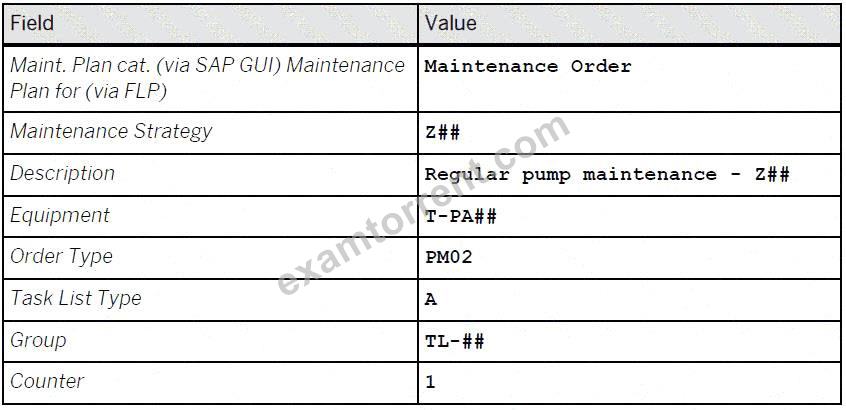
Correct Answer:
See the Explanation for complete Solution of this Task.
Explanation:
Task 8: Create a Maintenance Plan
The objective of this task is to create a strategy-based maintenance plan that will automatically generate work orders for your pump based on the frequencies defined in your task list.
Step 1: Access the Transaction
* Transaction Code : Enter IP42 in the command field and press Enter .
* Initial Screen :
* Maintenance Plan Category : Select Maintenance Order (or "Maintenance plan for Maintenance Order" if using the Fiori Launchpad).
* Maintenance Strategy : Enter Z48 .
* Press Enter .
Step 2: Enter Header and Maintenance Item Data
Once you are on the main creation screen, fill in the "Maintenance Item" section to define what is being maintained and how the orders should look:
* Description : Enter Regular pump maintenance Z48 .
* Equipment : Enter T-PA48 .
* Planning Plant : This should default to 1010 based on the equipment, but ensure it is correct.
* Order Type : Enter PM02 .
Explanation : By assigning Equipment T-PA48 and Order Type PM02 , you are telling SAP to generate a specific "Planned" maintenance order every time this schedule is triggered.
Step 3: Link the Task List
This step connects the plan to the specific maintenance steps (operations) you created in Task 7.
* Look for the Task List section at the bottom of the screen.
* Task List Type : Enter A (General Task List).
* Group : Enter TL-48 .
* Counter : Enter 1 .
* Press Enter to validate the connection. You should see the description "Regular Maintenance GR48" appear.
Explanation : Linking the Task List ensures that when the maintenance plan generates an order, it automatically copies the 30-minute operations you defined earlier into that order.
Step 4: Set Scheduling Parameters (Optional but Recommended)
While the table in your document focuses on the data above, typically you would click the Maintenance Plan Scheduling Parameters tab to ensure the "Scheduling Period" and "Start Date" are set. However, for the assessment, the mandatory data is what we entered in Steps 1-3.
Step 5: Save
* Click the Save (floppy disk) icon.
* Note your Maintenance Plan Number : The system will display a message at the bottom, such as
"Maintenance plan 123 saved." Write this number down , as you will need it for Task 9: Schedule a Maintenance Plan .
Task 8 is now complete! You have built the automated "brain" that will handle the recurring maintenance for your pump.
Viewing page 1 out of 6 pages.
Viewing questions 1-2 out of 12 questions.


 Curitis

 Carl

 Mike
 Hayden
 Barry
 Venus
 Cornelia
 Ron
 Miles

 Noel
 Pearl
 Janice
 Vito
 Mark
 Wallis
 Kevin
 Kelly
 Sheila


